To make a website AI-search friendly, first make sure search and AI crawlers can access it (robots.txt, firewall, sitemap), then make each page easy to understand: clear headings, direct answers near the top, facts in HTML text, accurate structured data, and consistent business details. Add trust signals such as authors, sources and updated dates. Google says no special markup is needed for its AI features beyond SEO fundamentals, and proposals like llms.txt aren't used by Google.
Access first: don't block the crawlers you want (Googlebot, Bingbot, OAI-SearchBot, PerplexityBot).
Write answer-first: a clear, direct answer near the top of each key page.
Put important facts in HTML text, not only in images, PDFs or videos.
Back claims with sources and keep business details consistent everywhere.
When someone asks ChatGPT, Perplexity, Copilot or Google's AI Mode a question about your industry, those systems run searches, read pages and assemble an answer, often with links to sources. Whether your website is one of those sources depends on things you can check today.
This checklist is practical: what to fix on your own site, what genuinely helps, and what's hype. For the bigger picture, read SEO vs AEO vs GEO.
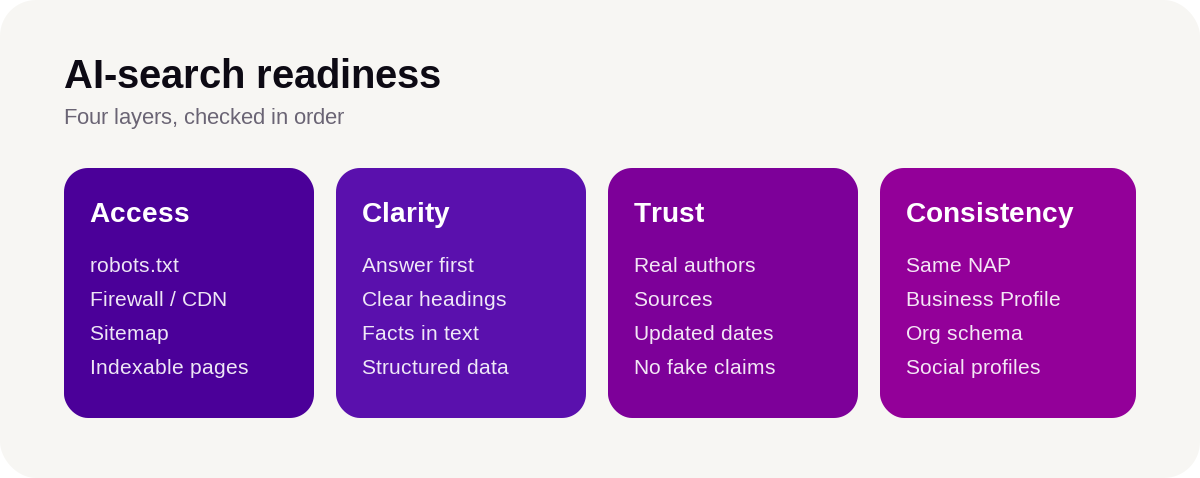
AI-search readiness in four layers
1. Access: can AI search systems reach your pages?
Nothing else matters if crawlers can't read your site.
robots.txt doesn't block the crawlers you want: Googlebot, Bingbot, and AI search crawlers such as OAI-SearchBot (ChatGPT search) and PerplexityBot.
Your firewall, CDN or security plugin isn't blocking bots you allowed in robots.txt. This is a common, silent problem.
An XML sitemap is submitted to Google Search Console and Bing Webmaster Tools (Copilot draws on Bing's index).
Important pages are indexable: no stray noindex tags, canonical tags pointing to the right URL.
A deliberate decision on training crawlers like GPTBot and Google-Extended. OpenAI documents that OAI-SearchBot and GPTBot are separate, so you can allow search while opting out of training if you prefer.
2. Clarity: can a machine understand each page quickly?
AI systems pull specific passages to answer specific questions. Make those passages easy to find.
One clear topic per page, stated in the title and H1.
A direct answer near the top of pages that target a question, in one to three sentences.
Descriptive H2s and H3s phrased the way people ask ("How much does X cost in Mumbai?").
Facts in HTML text: prices, specifications, service areas, hours. Not only in images, PDFs or videos.
Tables and lists for comparisons, steps and specifications.
Accurate structured data (Organization or LocalBusiness, Article, Product, Service, FAQ, Breadcrumb) that matches what's visible on the page. Google's structured data guide lists supported types.
Google's own guidance on AI features says there's no special markup required to appear in AI Overviews or AI Mode; the usual SEO fundamentals apply. Structured data is still worth doing because it removes ambiguity.
3. Trust: would an AI system be confident citing you?
Named authors with a short bio, or a clear editorial team, and an editorial policy.
Sources for facts and numbers, linked to primary documents where possible.
Published and updated dates that reflect real changes.
No invented statistics, reviews or testimonials. AI systems increasingly cross-check claims, and fake content erodes trust with people too.
Real proof of work: case studies, portfolios and project details you can stand behind.
4. Consistency: is your business described the same way everywhere?
When an assistant recommends a few businesses, it relies on what the web says about each one.
Name, address and phone identical on your website, Google Business Profile, Bing Places, directories and social profiles.
Services and locations described clearly and consistently.
Organization schema with your logo and links to official social profiles.
What about llms.txt?
llms.txt is a community proposal for a plain-text map of your site aimed at language models. Google has said it does not use llms.txt. Publishing one is harmless, but treat it as optional housekeeping, not a ranking tactic.
What doesn't work
Hidden text or keyword lists for "AI bots". Content that people can't see is a spam signal, not an AI signal.
Mass-produced FAQ pages with invented questions.
Buying placement in AI answers. There's no paid organic placement in AI search results.
Blocking everything by default and hoping to appear anyway.
How to measure progress
Google Search Console: AI Overviews and AI Mode clicks are included in overall performance data. Track impressions and clicks on your key pages.
Bing Webmaster Tools: the AI performance report shows citations in Copilot and Bing's AI answers.
Analytics: watch referral traffic from chatgpt.com, perplexity.ai and similar sources.
Enquiries: ask new customers how they found you. "ChatGPT recommended you" is now a real answer.
A 30-minute self-check
For a quick automated start, run your homepage through our free website checker, which tests crawler access, sitemap and schema. Then:
Open your robots.txt and check nothing important is blocked.
Search your business name in Google and Bing; check your profile details match your website.
Pick your three most important pages: does each answer its main question in the first few lines?
Check those pages for prices, service areas and contact details in plain text.
Run them through Google's Rich Results Test to confirm structured data is valid.
The bottom line
AI search rewards the same things good SEO always has, with extra weight on clarity, accuracy and trust. Make your site accessible to the right crawlers, answer questions directly, back up your claims and keep your business details consistent.
If you'd like help, our SEO team can audit your site for AI-search readiness alongside classic SEO, and our technical SEO checklist covers the foundations.
Frequently asked questions
Do I need a special file or schema for AI Overviews?
+
No. Google's guidance on AI features says no special optimisation or new markup is required; standard SEO best practices apply. Accurate structured data still helps search engines understand your pages.
Should I add an llms.txt file?
+
It's an optional community proposal. Google has said it doesn't use llms.txt. It's harmless to publish one as a plain map of your key pages, but don't expect it to change rankings or citations.
Will blocking GPTBot remove me from ChatGPT search?
+
OpenAI documents separate crawlers: OAI-SearchBot is used for ChatGPT search results, while GPTBot relates to model training. Blocking GPTBot alone doesn't block OAI-SearchBot; check OpenAI's documentation for current details.
How can I tell if AI search is sending me traffic?
+
Google includes AI Overviews and AI Mode traffic in Search Console's overall performance data. Bing Webmaster Tools has an AI performance report for Copilot citations. For other assistants, look for referral traffic in your analytics.
Is AI-search optimisation different from SEO?
+
It's built on the same foundations. The emphasis shifts slightly towards clear answers, factual accuracy, sources and brand consistency, because AI systems summarise and cite rather than just list links.
Articles are written and reviewed by the Incinc Media team, the people who plan, design, build and market websites, apps and campaigns for businesses from our head office in Mumbai and our branch offices in Faridabad and Greater Noida. We write about the questions clients ask us every week.
AI Overviews answer some questions right on the results page. That changes which searches send clicks, not whether SEO matters. Here's what Google says, and what to do.
AI answers are changing how people search, and a wave of new acronyms has followed. Here's what SEO, AEO and GEO really mean, what has changed, and what hasn't.
Great content can't rank if search engines can't crawl, understand and trust your pages. Use this checklist to find the technical issues that quietly hold business websites back.
Read
Start a project
Telluswhat you'rebuilding.
Whether you need a digital product, a creative campaign or a complete digital transformation, let's build something meaningful together.