Technical SEO Checklist for Business Websites: 50+ Checks That Matter
Great content can't rank if search engines can't crawl, understand and trust your pages. Use this checklist to find the technical issues that quietly hold business websites back.
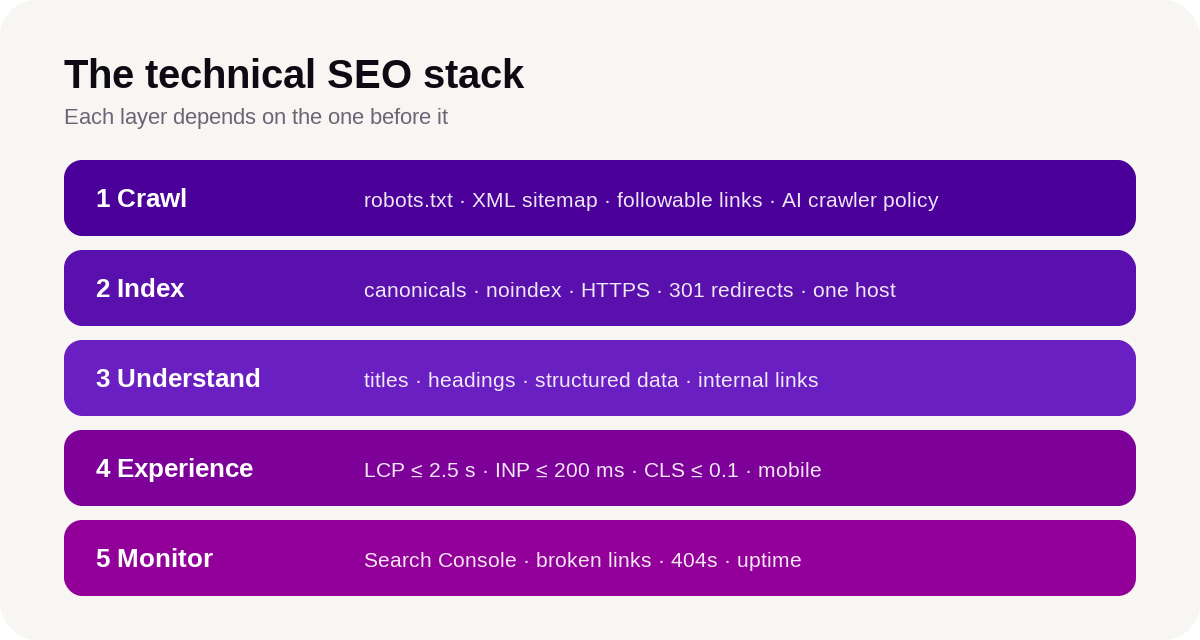
Technical SEO makes sure search engines and AI systems can crawl, render, index and understand your pages. The essentials are: a correct robots.txt and XML sitemap, one canonical URL per page, HTTPS and clean redirects, fast pages that pass Core Web Vitals (LCP within 2.5 s, INP within 200 ms, CLS within 0.1), a mobile-friendly layout, accurate structured data, sensible internal links, no broken pages, and Search Console monitoring.
Use robots.txt to manage crawling, and noindex to keep a page out of search; they're not the same.
Every indexable page needs one canonical URL, a unique title and a description.
Core Web Vitals 'good' thresholds: LCP ≤ 2.5 s, INP ≤ 200 ms, CLS ≤ 0.1, measured on real users.
Check Search Console's Page indexing and Core Web Vitals reports monthly.
Most business websites don't fail at SEO because of a missing keyword. They fail because of quieter problems: pages Google can't crawl, duplicate URLs splitting signals, slow mobile pages, redirects that lead nowhere, or a stray noindex left on after a redesign.
This checklist covers the technical checks that matter most for business websites. Work through it with your developer, or ask us to audit your site.
Five layers of technical SEO
Want a quick automated first pass? Run your homepage through our free website checker, then work through the full list below.
1. Crawling: can search engines reach your pages?
robots.txt exists at /robots.txt and doesn't block important pages, CSS, JavaScript or images
robots.txt links to your sitemap
No accidental "Disallow: /" left over from a staging site
Important content is in links search engines can follow: real <a href> links, not only buttons or scripts
AI crawlers are allowed or blocked deliberately, not by accident through a firewall or security plugin
Google's robots.txt introduction explains a key point: robots.txt manages crawling, not indexing. A blocked page can still appear in results if other sites link to it.
2. Indexing: are the right pages in Google, and only those?
XML sitemap lists all indexable pages and nothing else (no redirects, 404s or noindex pages); see Google's sitemap guide
Sitemap submitted in Google Search Console and Bing Webmaster Tools
lastmod dates reflect real content changes, not every deploy
No unintended noindex tags, especially after a redesign or migration
Thin or duplicate pages (tag archives, empty categories, test pages) are noindexed, merged or removed
Search Console's Page indexing report reviewed for "Crawled, currently not indexed" and errors
3. URLs and duplicates: one page, one address
HTTPS everywhere, with HTTP redirecting to HTTPS
One host: either www or non-www, with the other redirecting
Self-referencing canonical tag on every indexable page; see Google's canonical guide
Trailing slash, uppercase and parameter variants redirect or canonicalise to one version
Clean, readable URLs (/services/seo, not /page?id=123)
301 redirects for every changed or removed URL, pointing to the closest relevant page
No redirect chains or loops
4. On-page technical basics
Unique title tag on every page, roughly 50 to 60 characters, describing the page
Unique meta description, around 120 to 160 characters
One H1 per page, with H2 and H3 headings in a logical order
Descriptive alt text on meaningful images
Language set (lang="en-IN" or as appropriate)
Open Graph and X card tags with a 1200×630 image, so shared links look professional
No meta keywords tag: Google doesn't use it
5. Speed and Core Web Vitals
Core Web Vitals are measured on real users. According to web.dev, a page is "good" when, at the 75th percentile:
Validated with Google's Rich Results Test and Schema.org's validator, with no warnings ignored blindly
Structured data should describe what's genuinely on the page. Google's structured data introduction explains supported types. Never add fake reviews or ratings.
8. Internal linking and site structure
Every important page is linked from at least one other page (no orphans)
Key pages within a few clicks of the homepage
Descriptive anchor text ("website development cost in India", not "click here")
Breadcrumbs on deeper pages
No broken internal links (check with a crawler monthly)
9. AI search readiness
Google says no special optimisation is needed to appear in its AI features; standard SEO fundamentals apply. For AI search more broadly:
AI search crawlers allowed (for example OAI-SearchBot, PerplexityBot) if you want to appear in those results
Key facts in HTML text, not only in images or PDFs
Clear, direct answers near the top of pages that target questions
Consistent business details on your site and profiles
Technical SEO is the foundation everything else stands on. Make sure search engines can crawl and index the right pages, that each page has one clean URL, that pages are fast and mobile-friendly, and that structured data and internal links help machines understand your site. Then monitor it, because websites drift.
If you'd like a prioritised audit, our SEO team will run these checks on your site and tell you exactly what to fix first.
Frequently asked questions
How often should I run a technical SEO audit?
+
Run a full audit at least once or twice a year and after any redesign, migration or platform change. Check Search Console monthly for indexing errors, Core Web Vitals and security issues.
Does robots.txt stop a page from appearing in Google?
+
Not reliably. Robots.txt controls crawling. A blocked URL can still be indexed if other pages link to it. To keep a page out of search results, allow crawling and use a noindex meta tag, or protect it with a password.
Do Core Web Vitals affect rankings?
+
Google uses page experience signals, including Core Web Vitals, as part of its ranking systems, but relevance and helpful content matter more. Good scores also improve conversions, so they're worth the effort regardless.
Do I need structured data?
+
It isn't required to rank, but accurate structured data (Organization, LocalBusiness, Article, Product, FAQ, Breadcrumb) helps search engines understand your pages and can enable rich results.
Should I block AI crawlers?
+
Decide deliberately. Blocking AI search crawlers such as OAI-SearchBot can remove you from those AI search results. Training crawlers such as GPTBot or Google-Extended can be handled separately; Google-Extended doesn't affect Google Search or AI Overviews.
Articles are written and reviewed by the Incinc Media team, the people who plan, design, build and market websites, apps and campaigns for businesses from our head office in Mumbai and our branch offices in Faridabad and Greater Noida. We write about the questions clients ask us every week.
Schema markup is a label your website gives search engines: this is our business, this is a product, this is an article. Here's what still matters in 2026, and what Google has quietly retired.
AI answers are changing how people search, and a wave of new acronyms has followed. Here's what SEO, AEO and GEO really mean, what has changed, and what hasn't.
Read
Start a project
Telluswhat you'rebuilding.
Whether you need a digital product, a creative campaign or a complete digital transformation, let's build something meaningful together.