
Business Growth & Technology · 2 min read
Spreadsheets to Software: When Is It Time to Go Custom?
Off-the-shelf tools are a great start. Here are the signs your business has outgrown them, and what to consider before building.
Read
If your leads live in WhatsApp chats, notebooks and three different Excel files, you're losing customers you never knew you had. Here's how to choose a CRM that your team will actually use.
Quick answer
Choose a CRM by starting from how your team sells today: where leads come from (website, WhatsApp, calls, IndiaMART, ads), the stages a deal goes through, and who follows up. Pick the simplest tool that captures every lead automatically, shows follow-ups due, works well on mobile, integrates with WhatsApp and your website forms, and keeps customer data secure. Start with a ready-made CRM; build a custom one only when your process is genuinely unusual or the CRM must connect deeply with your own systems.
Many growing businesses in India run sales out of WhatsApp chats, a notebook and a few Excel sheets. It works until it doesn't: a lead waits three days for a reply, two people call the same customer, and nobody knows which ads actually brought sales.
A CRM (customer relationship management) system fixes that, but only if your team uses it. Here's how to choose one that fits how you actually sell.
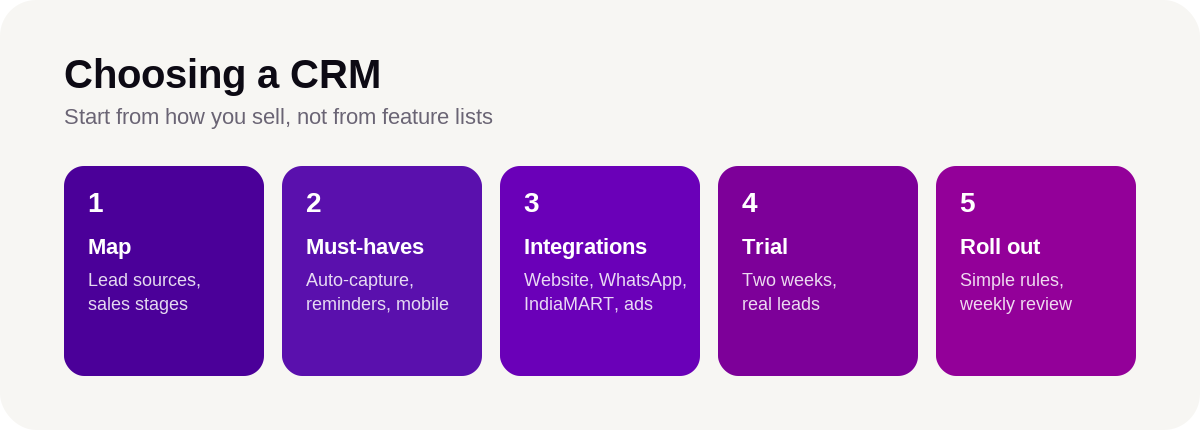
Before looking at any software, write down:
This one page decides most of your choice.
| Feature | Why it matters |
|---|---|
| Automatic lead capture | Form, ad and marketplace leads land in the CRM without copy-paste |
| Follow-up reminders | The single biggest win: no lead is forgotten |
| Mobile app | Field and sales teams work from phones |
| Simple pipeline view | Everyone sees where each deal stands |
| Source tracking | Shows which channels bring customers, not just leads |
| Roles and permissions | Control who sees and exports customer data |
| Reports | Leads, conversion and revenue by source and salesperson |
Nice-to-haves: quotations and invoices, email sequences, call logging, territory management.
Start ready-made if your process is fairly standard. You get a working system in days, and many CRMs have free or entry plans to learn what you need.
Consider custom when:
Our guide on when to build custom software goes deeper.
Run a two-week trial with one or two salespeople and real enquiries. Ask them:
Adoption matters more than features. A simple CRM that's used beats a powerful one that's ignored.
You're responsible for the personal data in your CRM. Limit exports, remove access when people leave, and follow India's DPDP Act, 2023.
The right CRM captures every lead automatically, reminds your team to follow up, works on mobile and with WhatsApp, and shows which channels bring sales. Map your process first, trial with real leads, and only go custom when your process genuinely needs it.
A CRM also powers simple email marketing to past customers. Our technology team can connect a CRM to your website and WhatsApp, or build one around your process. For getting more leads in the first place, see how to generate leads online in India.
If more than a handful of enquiries arrive each week from different channels, or several people follow up with customers, a CRM stops leads falling through the cracks and shows which channels bring sales.
Some well-known CRMs offer free plans with basic contact and deal tracking, with limits on users or features. They're a reasonable way to start and learn what you need before paying.
Many CRMs integrate with the WhatsApp Business Platform through Meta's API or partner providers, so chats and templates can be logged against each lead. Check how it handles your number and message costs.
Only if your sales process is unusual, you need deep integration with your ERP, billing or production systems, or per-user licences become expensive at your team size. Otherwise a ready-made CRM is faster and cheaper.
You're responsible for the personal data you collect. Choose a provider with clear security practices, control who can export data, and follow India's Digital Personal Data Protection Act.
Written by
Articles are written and reviewed by the Incinc Media team, the people who plan, design, build and market websites, apps and campaigns for businesses from our head office in Mumbai and our branch offices in Faridabad and Greater Noida. We write about the questions clients ask us every week.
Leads slipping through the cracks?
Tell us how leads reach you today. We'll recommend a CRM setup, or build a custom one if you genuinely need it, connected to your website and WhatsApp.
Business Growth & Technology · 2 min read
Off-the-shelf tools are a great start. Here are the signs your business has outgrown them, and what to consider before building.

Digital Marketing · 5 min read
More traffic isn't the goal. More genuine enquiries are. Here's a step-by-step plan that works for service businesses, manufacturers and local brands in India.
AI & Automation · 4 min read
Most owners lose hours every day to copy-paste work: retyping enquiries, chasing payments, sending the same replies. Here's what to automate first, with tools you can start using this week.
Start a project
Whether you need a digital product, a creative campaign or a complete digital transformation, let's build something meaningful together.
Or call +91 81081 14819·mail@incincmedia.com