Measuring Your Marketing: What to Track (and What to Ignore)
Likes feel good, but they don't pay the bills. Track a few numbers that connect marketing to enquiries and sales, set them up properly, and review them monthly.
Track a small set of numbers that connect marketing to revenue: enquiries and where they came from, cost per enquiry, conversion rate on key pages, customers won and their value, and repeat customers. Set up GA4 key events for forms, calls and WhatsApp clicks, tag campaign links with UTM parameters, and record lead sources in a sheet or CRM. Treat followers, likes and impressions as signals of reach, not results, and review the same few numbers every month.
Start from your goal: enquiries, bookings, store visits or online sales.
Core numbers: enquiries by source, cost per enquiry, conversion rate, customers and revenue.
Mark forms, calls and WhatsApp clicks as GA4 key events.
Likes and impressions show reach, not results; review monthly, not daily.
Track a few numbers that connect marketing to revenue: enquiries and where they came from, cost per enquiry, conversion rate, customers won and their value. Treat followers, likes and impressions as signals of reach, not results.
Dashboards can show hundreds of numbers. Most don't help you decide anything. This guide shows which ones matter, how to set them up and how to review them.
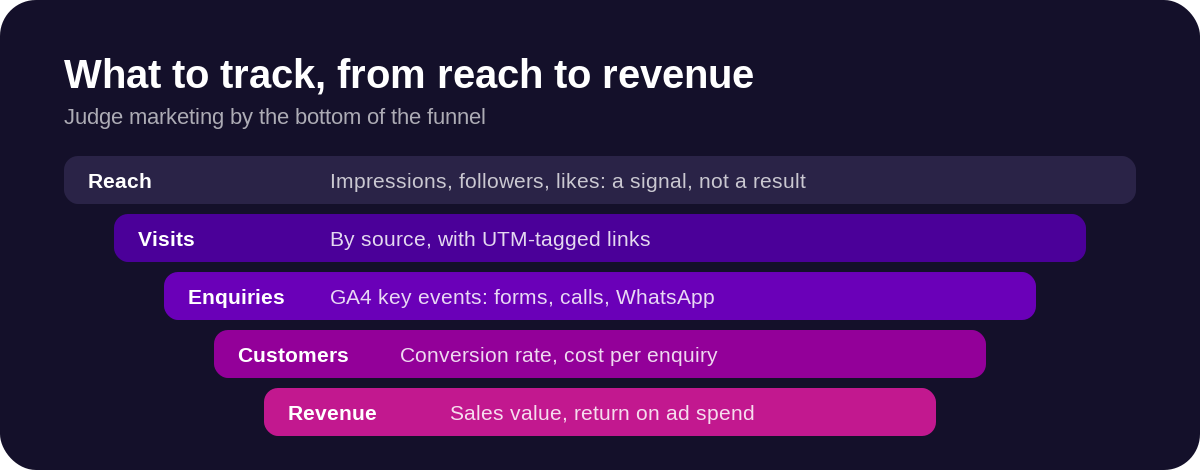
From reach to revenue
Start with your goal
Your goal decides which numbers matter:
Goal
Main number to track
Enquiries for a service business
Enquiries (forms, calls, WhatsApp) and cost per enquiry
Online sales
Orders, revenue and return on ad spend
Bookings or appointments
Bookings and show-up rate
Store visits
Direction requests and calls from Google Business Profile
Write the goal down with a number and a date, such as "40 enquiries a month by March".
The numbers that matter
Enquiries by source: how many came from Google search, ads, Instagram, referrals or WhatsApp.
Cost per enquiry: ad spend divided by enquiries from ads.
Conversion rate: the share of visitors to a key page who enquire or buy.
Customers and revenue: how many enquiries became paying customers, and what they spent.
Repeat customers: how many come back, which shows whether marketing and service work together.
1. Mark key events in Google Analytics 4. Track form submissions, phone clicks, WhatsApp clicks and purchases as events, then mark them as key events. Google's help on marking key events explains how; standard properties can mark up to 30.
Don't mark page_view as a key event; Google advises creating a specific event (such as a thank-you page visit) instead.
Key events count from when you mark them; they don't change past data.
2. Tag campaign links with UTM parameters, so Analytics shows which email, post or ad brought each visit. Our free UTM link builder makes them consistent.
3. Record lead source for every enquiry in a sheet or CRM, including phone and walk-in enquiries that analytics can't see. Ask "How did you hear about us?" and write it down.
High clicks with no enquiries can mean the wrong audience
Bounce rate
Can be fine if visitors find a phone number and call
Watch these for trends, but judge marketing by enquiries and sales.
A simple monthly review
Write down this month's enquiries, cost per enquiry, customers and revenue by channel.
Compare with last month and the same month last year if you have it.
Note what changed: new campaign, new page, season, price.
Choose one or two things to try next month.
Keep the sheet; patterns appear after a few months.
Simple and consistent beats complex and occasional.
The bottom line
Pick a few numbers that link marketing to revenue, set up GA4 key events and lead-source tracking so they're accurate, and review them monthly. Followers and likes are useful signals, not goals.
What are the most important marketing metrics for a small business?
+
Enquiries and where they came from, cost per enquiry, conversion rate on key pages, the number and value of customers won, and how many come back. These connect marketing to revenue.
What is a key event in Google Analytics 4?
+
An event you mark as important, such as a form submission or a WhatsApp click. GA4 reports key events separately, and you can import them into Google Ads as conversions. Standard properties can mark up to 30 events as key events.
Should I mark page views as a key event?
+
No. Google advises against it because every page view would count. Instead, create a specific event, such as a visit to a thank-you page, and mark that.
Are followers and likes useless?
+
Not useless, but they're signals of reach and interest, not business results. Watch them for trends, and judge success by enquiries and sales.
How often should I review marketing numbers?
+
Monthly for most small businesses, with a quick weekly check on active ad campaigns. Compare the same numbers each time and pick one or two changes to test.
Articles are written and reviewed by the Incinc Media team, the people who plan, design, build and market websites, apps and campaigns for businesses from our head office in Mumbai and our branch offices in Faridabad and Greater Noida. We write about the questions clients ask us every week.
A 4x ROAS can still lose money. Here's how to calculate the numbers that matter, from cost per lead to real profit, with a worked example you can copy.
Google Analytics 4 tells you where visitors come from and which pages lead to enquiries. Here's a practical setup you can finish in an afternoon, and the settings most people miss.
Most businesses don't need a 40-page strategy deck. They need clear answers to seven questions, written on one page, and the discipline to review it every month.
Read
Start a project
Telluswhat you'rebuilding.
Whether you need a digital product, a creative campaign or a complete digital transformation, let's build something meaningful together.