
AI & Automation · 2 min read
Practical Ways Small Businesses Can Use AI Today
AI doesn't have to be complicated or expensive. Here are realistic, everyday uses that save time.
Read
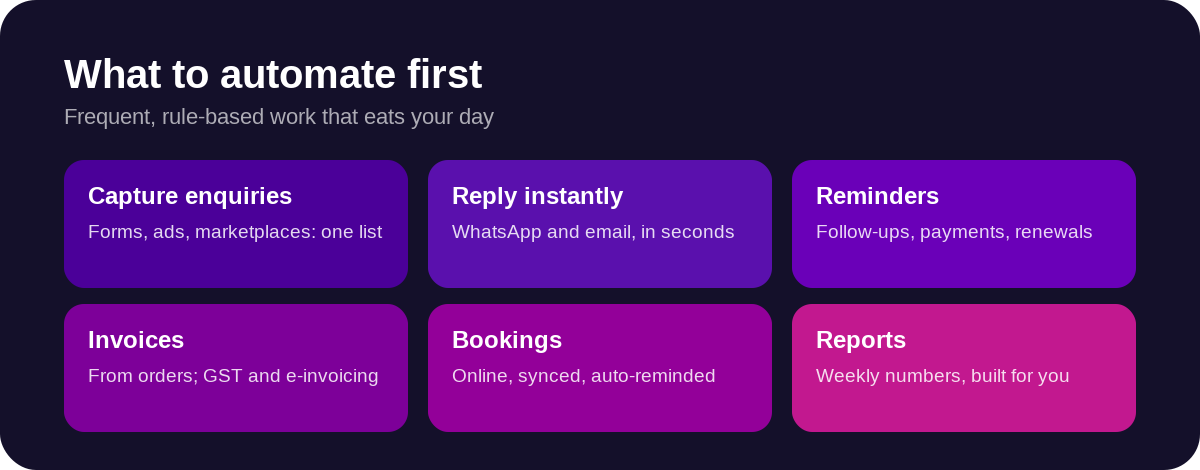
Most owners lose hours every day to copy-paste work: retyping enquiries, chasing payments, sending the same replies. Here's what to automate first, with tools you can start using this week.
Quick answer
Start automating the repetitive tasks that happen many times a day and follow the same steps: capturing enquiries from forms and ads into one place, instant WhatsApp and email acknowledgements, follow-up and payment reminders, invoice generation, appointment booking and weekly reports. Use the features already in your tools first (WhatsApp Business, accounting software, CRM), connect apps with automation tools, and use AI for drafting and summarising, always with a human checking anything customer-facing.
Ask a small business owner where their day goes and you'll hear the same list: retyping enquiries into a sheet, replying to the same WhatsApp questions, chasing payments, making invoices, and building a report on Saturday night. None of it needs a person's judgement, and all of it can be automated.
Here's what to automate first, how, and where AI genuinely helps.
Automate a task when it:
Write the steps down first. Automating a messy process just makes the mess faster.
Website forms, ad lead forms, marketplace leads and emails should all land in one list or CRM automatically, tagged with their source. No retyping, no lost enquiries. See how to choose a CRM.
A fast "Thanks, we'll call you within working hours" keeps the lead warm while your team gets to it.
Online booking with calendar sync and automatic reminders reduces calls and no-shows for clinics, salons, consultants and service businesses.
A dashboard that pulls leads, sales and payments from your tools every week, instead of a weekend spent in Excel. Pair it with what to track in your marketing.
Keep a person reviewing anything customer-facing or financial. See our guide to practical AI tools for small business.
| Week | Automate |
|---|---|
| 1 | Enquiry capture into one place + instant acknowledgement |
| 2 | WhatsApp quick replies and follow-up reminders |
| 3 | Invoices and payment reminders |
| 4 | A weekly report that builds itself |
Automate frequent, rule-based work first: enquiries, replies, reminders, invoices and reports. Use the tools you already have, connect them, add AI for drafting and summarising with a human check, and build custom only where it pays off.
For the wider roadmap, read how to digitally transform a traditional business. Our technology team can set up these automations or build what your process needs.
Lead capture and instant replies, because slow responses lose customers. Then follow-up and payment reminders, invoicing, and weekly reports.
Usually not at first. WhatsApp Business, your accounting software, a CRM and an automation tool that connects apps cover most needs. Custom software makes sense when your process is unusual or tools don't integrate.
AI is best at drafting, summarising and sorting. It frees people for higher-value work but makes mistakes, so keep a person reviewing anything sent to customers or affecting money.
Yes, within WhatsApp's rules. The WhatsApp Business app has quick replies, greeting and away messages; larger-scale automation uses the WhatsApp Business Platform with approved message templates and customer opt-in.
Businesses above the GST e-invoicing turnover threshold must generate e-invoices through the official system. Many accounting tools automate this; check the current threshold with your accountant.
Written by
Articles are written and reviewed by the Incinc Media team, the people who plan, design, build and market websites, apps and campaigns for businesses from our head office in Mumbai and our branch offices in Faridabad and Greater Noida. We write about the questions clients ask us every week.
Spending hours on repetitive work?
Walk us through a typical day. We'll point out what can be automated with tools you already have, and what's worth building.
AI & Automation · 2 min read
AI doesn't have to be complicated or expensive. Here are realistic, everyday uses that save time.
Business Growth & Technology · 4 min read
If your leads live in WhatsApp chats, notebooks and three different Excel files, you're losing customers you never knew you had. Here's how to choose a CRM that your team will actually use.
Business Growth & Technology · 2 min read
Your customers are already on WhatsApp. A few simple settings can turn it into an organised, professional sales channel.
Start a project
Whether you need a digital product, a creative campaign or a complete digital transformation, let's build something meaningful together.
Or call +91 81081 14819·mail@incincmedia.com