How to Choose a Domain Name for Your Business: .com, .in and More
Your domain is your address online for years, so it's worth choosing carefully. Here's how to pick one that's easy to remember, right for your market and fully owned by you.
Choose a business domain name that matches your brand, is short, easy to say and spell, and has no hyphens or confusing numbers. Pick .com for a global audience or .in to signal an Indian audience, and consider registering both. Check the name isn't someone else's trademark, register it through an accredited registrar in your business's own account, turn on auto-renew, and use it for professional email. Keywords in the domain extension give no SEO advantage, so prioritise brand and memorability.
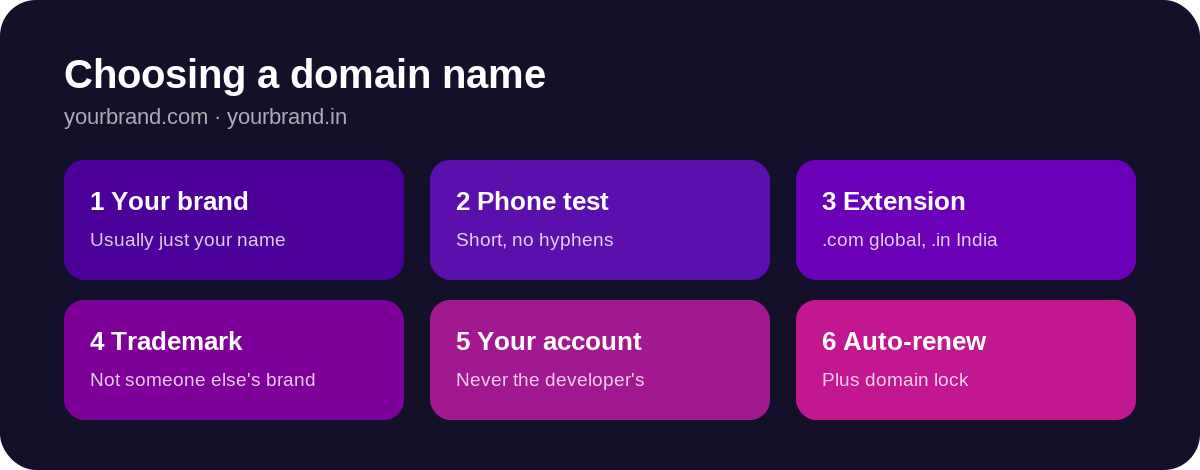
Short, easy to say and spell, no hyphens: your domain should pass the phone test.
.com for global reach, .in for an Indian audience; register both if you can.
Register in your own business account, not a developer's, and turn on auto-renew.
Keywords in the extension don't help SEO; brand and memorability matter more.
A good business domain name matches your brand, is short and easy to say and spell, avoids hyphens and confusing numbers, uses the right extension for your market (.com for global, .in for India) and is registered in your own business account. It's your address online for years, so a few minutes of care now saves rebranding, lost email and lost customers later.
Here's how to choose one, and the ownership mistakes that cause the most trouble.
Six checks before you register
1. Start with your brand name
The best domain is usually simply your business name: yourbrand.com or yourbrand.in. It's what customers will type after hearing your name or seeing your sign.
If that's taken:
Add a short, relevant word: yourbrandstudio.com, getyourbrand.com, yourbrandmumbai.in.
Try another extension your audience trusts.
Avoid misspellings of your own name; customers will type the correct spelling and end up elsewhere.
2. Make it pass the phone test
Say your domain out loud to someone and ask them to type it. If you have to spell it, it needs work.
Short: fewer characters, fewer typos.
No hyphens: people forget them or confuse them with underscores.
No confusing numbers: is it "4" or "four"?
No double letters at word joins:swissstore.com is easy to mistype.
Easy in Indian accents and English: test it with your actual customers.
3. Choose the right extension
Extension
Best for
Notes
.com
Businesses with customers worldwide
Most familiar globally; good names are scarce
.in
Businesses focused on India
A country-code domain; a strong signal your site is for India
.co.in
Indian companies
Less common than .in for new brands
Others (.studio, .agency, .shop)
Creative or niche brands
Fine to use; less familiar to some customers
Google treats country-code domains like .in as a strong signal that a site is intended for that country. Generic extensions like .com can serve any country. Google has also said that keywords in a domain extension give no advantage or disadvantage in search.
If you can, register both .com and .in for your name and redirect one to the other. It protects your brand and catches people who type the "wrong" one.
4. Check it's not someone else's brand
Before you register:
Search the name on Google, social media and marketplaces.
Check India's trademark registry for similar registered marks in your category.
Check the matching Instagram, LinkedIn and YouTube handles are available.
Using a name that matches someone else's trademark can lead to disputes and a forced rebrand.
5. Register it properly, in your name
This is where many businesses get caught out.
Use an accredited registrar..in domains are managed by the .IN Registry, operated by NIXI, and sold through accredited registrars.
Register in your business's name, in an account you control, using an email address you'll keep (not a personal Gmail of a former employee).
Never let a developer or agency register it in their account. Give them access instead. If you part ways, you keep the domain.
Keep login details and two-factor authentication secure.
6. Keep it safe
Turn on auto-renew and keep payment details current. An expired domain takes your website and email down with it, and after a grace period someone else can register it.
Renew for several years if your registrar allows.
Enable domain lock to prevent unauthorised transfers.
Use privacy protection where available to reduce spam.
7. Use it for professional email
Set up email on your domain, such as hello@yourbrand.in. It looks more trustworthy than a free email address, keeps customer conversations under your control and continues to work if staff change.
If you already have a domain you don't like
Changing domains is possible, but Google treats it as a site move that takes time to settle. Plan redirects from every old page to its new address, update your Google Business Profile and listings, and keep renewing the old domain so the redirects keep working.
The bottom line
Choose a domain that's your brand, short and easy to say, on the right extension for your market, checked for trademarks and registered in your own business account with auto-renew on. Get those right and you won't have to think about it again for years.
If you mainly serve customers in India, .in is a clear local signal and often easier to get. If you serve customers worldwide, .com is usually the best fit. Many businesses register both and redirect one to the other.
Does having keywords in my domain help SEO?
+
Not meaningfully. Google says keywords in the domain extension give no advantage or disadvantage, and a brandable name is easier to remember and trust. Rankings depend far more on your content and reputation.
Where should I buy a .in domain?
+
Through a registrar accredited by the .IN Registry, which is operated by the National Internet Exchange of India (NIXI). Many popular registrars offer .in domains.
Who should own my domain?
+
Your business. Register it in your company's name, in an account you control, with your own email address. Give your developer access if needed, but never let the domain sit in their personal account.
What happens if my domain expires?
+
Your website and email can stop working, and after a grace period the domain can be released for anyone to register. Turn on auto-renew, keep payment details current and consider renewing for several years.
Articles are written and reviewed by the Incinc Media team, the people who plan, design, build and market websites, apps and campaigns for businesses from our head office in Mumbai and our branch offices in Faridabad and Greater Noida. We write about the questions clients ask us every week.
Two quotes for 'a website' can differ by ten times, and both can be fair. Here's what actually drives the price, what you'll pay every year after launch, and how to compare quotes properly.
Your Instagram can grow fast, but you don't own it, Google rarely shows it for buying searches, and it can't answer every question a customer has. A website does those jobs.
Read
Start a project
Telluswhat you'rebuilding.
Whether you need a digital product, a creative campaign or a complete digital transformation, let's build something meaningful together.