

Website Development · 2 min read
Why Is My Website Slow? Common Causes and Simple Fixes
A slow website frustrates visitors and costs enquiries. Most speed problems come from a handful of familiar causes.
Read
Core Web Vitals are Google's three measures of how a page feels to real visitors: how fast it loads, how quickly it responds and how stable it stays. Here's what each one means and how to fix it.

Quick answer
Core Web Vitals are three metrics Google uses to measure real-user experience on a page: Largest Contentful Paint (LCP, loading; good is 2.5 seconds or less), Interaction to Next Paint (INP, responsiveness; good is 200 milliseconds or less) and Cumulative Layout Shift (CLS, visual stability; good is 0.1 or less). They're judged at the 75th percentile of real visits from Chrome users. Google's ranking systems use them, but good scores don't guarantee top rankings; relevant, helpful content still matters most.
Core Web Vitals are three metrics Google uses to measure how a page feels to real visitors: how quickly the main content loads (LCP), how quickly the page responds when someone taps or clicks (INP) and how stable the layout stays while it loads (CLS). They matter for two reasons: visitors leave slow, jumpy pages, and Google uses these metrics in its ranking systems.
This guide explains each metric in plain English, the thresholds you need to hit, where to check yours and what usually fixes them.
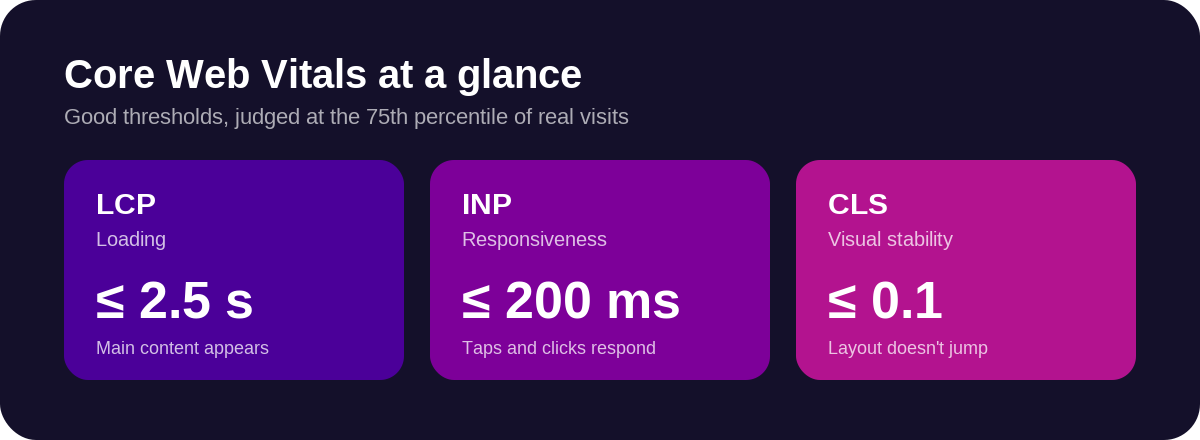
| Metric | What it measures | Good | Needs improvement | Poor |
|---|---|---|---|---|
| LCP (Largest Contentful Paint) | Loading: when the biggest image or text block appears | ≤ 2.5 s | 2.5 to 4 s | > 4 s |
| INP (Interaction to Next Paint) | Responsiveness: delay after a tap, click or key press | ≤ 200 ms | 200 to 500 ms | > 500 ms |
| CLS (Cumulative Layout Shift) | Visual stability: how much content jumps around | ≤ 0.1 | 0.1 to 0.25 | > 0.25 |
Thresholds are from Google's Web Vitals guide. A page passes when all three are good at the 75th percentile of real visits, meaning at least three in four visits have a good experience. Google explains why it chose this approach in how the thresholds were defined.
Largest Contentful Paint is the moment the largest visible element, usually a hero image, banner or headline, finishes rendering. To visitors, it's when the page "looks loaded".
Common causes of slow LCP:
Fixes that usually work: resize and compress the hero image and serve it as WebP or AVIF, don't lazy-load it, use caching and a CDN, and cut unused scripts. Our guide to why websites are slow covers the basics.
Interaction to Next Paint measures the delay between a visitor's action (tapping a menu, clicking "Add to cart", typing in a form) and the screen visibly responding. INP replaced First Input Delay as a Core Web Vital in March 2024 because it looks at all interactions, not just the first.
Common causes of poor INP:
Fixes that usually work: remove scripts you don't need, load non-essential ones later, break up long JavaScript tasks and keep pages lean. INP is often the hardest to fix on plugin-heavy sites.
Cumulative Layout Shift measures unexpected movement: text jumping down as an image loads, or a button moving just as someone taps it. It's measured as a score, not in seconds.
Common causes of high CLS:
Fixes that usually work: always set image and video dimensions, reserve space for banners and embeds, and load fonts carefully. Google's list of the most effective ways to improve Core Web Vitals goes deeper on all three.
This is the most common source of confusion.
So a page can score 70 in the lab and still pass Core Web Vitals in the field, or the other way round. Low-traffic pages may have no field data at all; Google then uses data for similar pages or the whole site where available.
Yes, but less than many people think. Google's Search Central documentation says Core Web Vitals are used by its ranking systems and recommends achieving good scores. It also says that good scores don't guarantee top rankings, and that relevance and helpful content come first.
Treat Core Web Vitals as a tie-breaker and a conversion booster, not a shortcut. A fast page with thin content won't outrank a genuinely useful one. But between two useful pages, a faster one has an edge, and it converts more visitors into enquiries.
Core Web Vitals measure whether your pages load quickly (LCP ≤ 2.5 s), respond quickly (INP ≤ 200 ms) and stay stable (CLS ≤ 0.1) for real visitors. They're part of Google's ranking systems, but mostly they're about not losing customers to a slow, jumpy page. Check field data, fix the biggest causes first and keep new scripts in check.
Our website development team builds sites with performance budgets from day one. For the rest of the technical foundations, see our technical SEO checklist.
Largest Contentful Paint (LCP), which measures loading; Interaction to Next Paint (INP), which measures responsiveness to clicks, taps and key presses; and Cumulative Layout Shift (CLS), which measures how much the page jumps around while loading.
LCP of 2.5 seconds or less, INP of 200 milliseconds or less and CLS of 0.1 or less, measured at the 75th percentile of page visits. A page passes when all three are in the good range.
Yes, Google says its ranking systems use Core Web Vitals as part of page experience. But Google also says good scores don't guarantee top rankings, and a page with more relevant, helpful content can still outrank a faster one.
The 0–100 performance score comes from a lab test on a simulated device. Search Console and the 'real users' section of PageSpeed Insights use field data from Chrome users over the previous 28 days. Field data is what Google uses for Core Web Vitals.
Interaction to Next Paint replaced First Input Delay as a Core Web Vital in March 2024. INP looks at all interactions on a page, not just the first one, so it's a better measure of responsiveness.
Written by
Articles are written and reviewed by the Incinc Media team, the people who plan, design, build and market websites, apps and campaigns for businesses from our head office in Mumbai and our branch offices in Faridabad and Greater Noida. We write about the questions clients ask us every week.
Failing Core Web Vitals?
Run your page through our free website checker for a quick read, or ask us for a full speed audit with a prioritised fix list for your site.
Website Development · 2 min read
A slow website frustrates visitors and costs enquiries. Most speed problems come from a handful of familiar causes.

SEO & AI Search · 6 min read
Great content can't rank if search engines can't crawl, understand and trust your pages. Use this checklist to find the technical issues that quietly hold business websites back.

Web Design & UX · 5 min read
Most websites don't fail loudly. They load a little slowly, hide the phone number, say nothing specific, and visitors leave. Here are the ten mistakes we see most, and how to fix each one.
Start a project
Whether you need a digital product, a creative campaign or a complete digital transformation, let's build something meaningful together.
Or call +91 81081 14819·mail@incincmedia.com