

Web Design & UX · 2 min read
The Anatomy of a Landing Page That Converts
A landing page has one job. Here's the structure that helps visitors understand your offer and take action.
Read
Most websites don't fail loudly. They load a little slowly, hide the phone number, say nothing specific, and visitors leave. Here are the ten mistakes we see most, and how to fix each one.
Quick answer
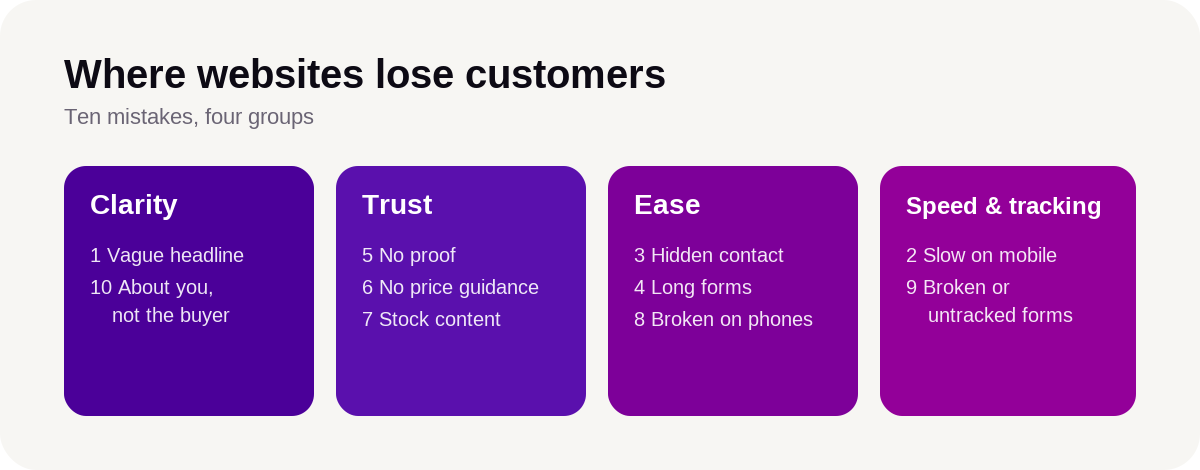
The website mistakes that lose customers most often are a vague headline, slow mobile loading, hard-to-find contact options, long forms, no proof of work, no prices or ranges, generic stock content, poor mobile layout, broken or untracked forms, and pages built around the business instead of the buyer. Most can be fixed without a full redesign: clarify the offer, add call and WhatsApp buttons, shorten forms, show real work, speed up mobile pages and track every enquiry.
Websites rarely fail dramatically. They lose customers quietly: a headline that says nothing, a phone number buried in the footer, a form that asks for too much, a page that takes too long on 4G. Each one costs a few enquiries a week, and together they can cost most of them.
Here are the ten mistakes we see most often on business websites in India, and a practical fix for each.
"Welcome to ABC Enterprises" or "Excellence in every project" tells a visitor nothing.
Fix: state what you do, for whom and where. "Industrial packaging machines, built in Mumbai, installed across India." Visitors decide within seconds whether to stay.
Most visitors arrive on phones, often on patchy mobile data. Heavy images, sliders and plugins make pages crawl.
Fix: compress images, remove unused scripts and test on a real phone. Google's Core Web Vitals treat loading the main content within 2.5 seconds as good. Our guide on why your website is slow covers the usual causes, and Core Web Vitals explained goes deeper.
If someone has to scroll to the footer to find your number, many won't.
Fix: add a visible call button and a WhatsApp button on every page, especially on mobile, plus a clear "Get a quote" or "Book a visit" action in the header.
Company size, budget, GST number, full address, a long message: every field is a reason to give up.
Fix: ask for name, phone and requirement. Collect the rest on the call.
"Trusted by hundreds of clients" without names, photos or examples isn't proof.
Fix: show real projects, client logos you have permission to use, genuine reviews, certifications and photos of your team or facility. Specifics build trust; adjectives don't.
Buyers want to know whether you're in their range before they call. "Contact for price" on everything sends them to a competitor who explains.
Fix: show starting prices, ranges or packages where you can. If prices genuinely vary, explain what they depend on. Our website cost guide is an example of explaining cost drivers honestly.
Stock photos of handshakes and copy that could describe any company make you forgettable.
Fix: use your own photos of work, people and premises. Write about your actual process, materials, areas and customers.
Tiny text, buttons too close together, tables that scroll sideways, pop-ups that cover the page.
Fix: check every key page on a phone. Keep text readable with enough contrast (see the W3C contrast guidance), make buttons easy to tap, and avoid pop-ups that block content on arrival.
We regularly find contact forms that send to an old email address, land in spam, or fail silently.
Fix: submit your own forms every month. Track form submissions, calls and WhatsApp clicks in analytics so you notice when enquiries drop. See what to track in your marketing.
Long histories and mission statements on the home page, while the buyer's real questions go unanswered.
Fix: lead with the customer's problem and how you solve it. Answer common questions on the page: timelines, process, areas served, after-sales support.
For technical basics like page titles, mobile setup and speed, run your site through our free website checker.
Most of these mistakes are content and layout fixes, not reasons to rebuild. Consider a redesign when the platform itself is slow, hard to update or can't be made properly mobile-friendly. If you're weighing platforms, read custom website vs WordPress.
Visitors leave when they're unsure what you do, unsure whether to trust you, or find it awkward to contact you. Fix clarity, proof and contact options first, then speed and tracking. Small changes on the pages that matter most often bring more enquiries than a brand-new site.
Our website development team can review your site and fix what's costing you customers. For the bigger picture, see how to generate leads online in India. To make sure everyone can use your site, work through our website accessibility basics.
Usually because visitors can't quickly tell whether you solve their problem, don't trust you yet, or find it awkward to contact you. Fix the headline, proof and contact options first.
If the site is built on a sound, fast platform, targeted fixes to content, contact options and speed often help more than a redesign. Redesign when the platform is slow, hard to edit or can't be made mobile-friendly.
Where possible, show starting prices or ranges, or explain what affects the price. Buyers who can't find any guidance often contact a competitor who gives it.
Google's Core Web Vitals guidance treats loading the main content within 2.5 seconds as good. Test your key pages on mobile, not just desktop.
Look at your own site on a phone as a new customer would, ask a friend to find your price and contact details, and run a free automated check for technical basics.
Written by
Articles are written and reviewed by the Incinc Media team, the people who plan, design, build and market websites, apps and campaigns for businesses from our head office in Mumbai and our branch offices in Faridabad and Greater Noida. We write about the questions clients ask us every week.
Want a second pair of eyes on your website?
Send us your link. We'll point out what's likely costing you enquiries and what to fix first, before you spend on a redesign.
Web Design & UX · 2 min read
A landing page has one job. Here's the structure that helps visitors understand your offer and take action.

Website Development · 2 min read
A slow website frustrates visitors and costs enquiries. Most speed problems come from a handful of familiar causes.

Digital Marketing · 5 min read
More traffic isn't the goal. More genuine enquiries are. Here's a step-by-step plan that works for service businesses, manufacturers and local brands in India.
Start a project
Whether you need a digital product, a creative campaign or a complete digital transformation, let's build something meaningful together.
Or call +91 81081 14819·mail@incincmedia.com