Custom Website vs WordPress: Which Is Better for Your Business?
WordPress runs a huge share of the web, and custom builds power the fastest, most distinctive sites. The right choice depends on who edits the site, what it must do and how long it needs to last.
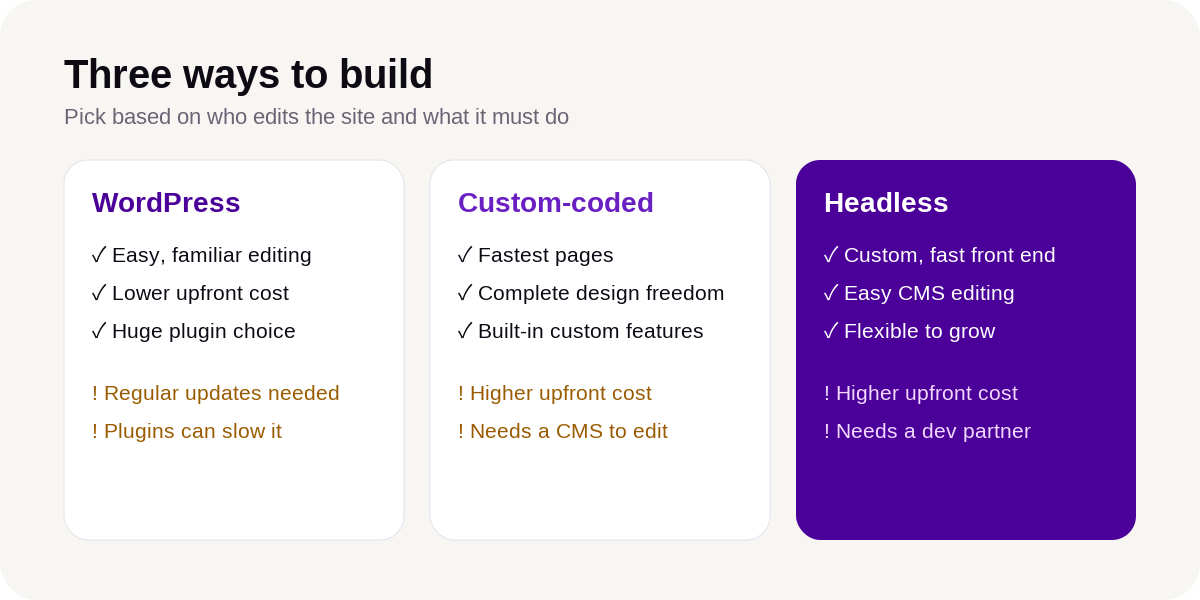
Choose WordPress if your team will publish content often, you want a huge choice of themes and plugins, and you can commit to regular updates and security maintenance. Choose a custom or headless build if speed, a distinctive design, custom features or tight security matter more, and you have a development partner for changes. Many businesses get the best of both with a custom front end and an easy-to-use content editor behind it.
WordPress core is free, open-source software; you pay for hosting, premium themes or plugins, and maintenance.
Custom builds cost more upfront but avoid plugin bloat and can be faster and more secure by design.
The editing experience matters as much as the technology: decide who updates the site and how often.
Headless setups pair a custom, fast front end with a content editor your team can use.
"Should we build on WordPress or get a custom website?" comes up in almost every first conversation we have about a new site. Both are good answers in the right situation. The mistake is choosing on habit or on the first quote you receive.
This guide compares the two honestly, including the hybrid option that's increasingly common: a custom front end with an easy content editor behind it.
What each option actually means
WordPress (self-hosted): free, open-source software from WordPress.org that you install on your own hosting. You choose a theme (or have one built) and add features with plugins.
Custom-coded website: a site built specifically for you with a modern framework. Every page and feature is written for your needs, with no theme or plugin layer.
Headless (hybrid): a custom-built front end for speed and design freedom, connected to a content management system (CMS) where your team edits pages, blogs or products.
Growing businesses that want both speed and easy editing
When WordPress is the right choice
Your team will publish blogs, news or pages every week and wants a familiar editor.
You need common features that mature plugins already handle well: forms, SEO fields, galleries, simple e-commerce with WooCommerce.
Your budget is limited and you're comfortable with a well-chosen theme.
You can commit to regular maintenance: updates, backups and security checks. Our website maintenance checklist covers the routine.
Watch out for: plugin overload. Each plugin adds code, potential conflicts and another thing to update. A WordPress site with 40 plugins is usually slower and more fragile than it needs to be.
When a custom website is the right choice
Speed and Core Web Vitals matter to your sales or ads performance. Google's Core Web Vitals targets (such as loading the main content within 2.5 seconds) are easier to hit without theme and plugin overhead.
Your brand needs a distinctive design that templates can't deliver.
You need custom features: calculators, configurators, portals, dealer logins, integrations with your ERP or CRM.
You want fewer moving parts to secure and maintain.
Watch out for: sites built without any CMS. If every text change needs a developer, the site goes stale. Insist on an editing setup that suits your team.
The hybrid: custom front end, easy editing
For many growing businesses, the sweet spot is a headless build: the public site is custom-coded for speed and design, while your team edits content in a CMS. You get:
Fast, distinctive pages that score well on performance
A simple editor for blogs, case studies and product updates
Freedom to change the CMS or front end later without rebuilding everything
It costs more than a template WordPress site upfront, but often less than heavily customised WordPress over a few years.
Five questions that decide it
Who updates the site, and how often? Weekly marketing updates favour WordPress or headless; rare updates make a fully custom site practical.
What must the site do beyond showing information? The more custom features, the stronger the case for custom development.
How much does speed matter? If you run ads or compete hard in search, every second counts.
Who maintains it? WordPress needs routine updates; custom sites need a development partner for changes.
What's the three-year cost? Add build cost, licences, hosting, maintenance and expected changes. See our website cost guide for the line items.
Not sure how your answers add up? Our free website planner suggests a platform from six quick questions.
Common mistakes
Choosing WordPress because it's "free". The software is free; a good, secure, fast WordPress site is not.
Choosing custom without a CMS. You'll pay a developer for every typo.
Buying a theme that fights your content. Design should follow your content, not the other way round.
Ignoring migration. Moving from one platform to another later needs redirects to protect SEO; plan for it either way.
The bottom line
WordPress is excellent for content-heavy sites and tighter budgets, if it's maintained properly. Custom builds win on speed, design freedom and custom features. Headless gives growing businesses both. Decide based on who edits the site, what it must do and the total cost over three years.
The WordPress software (from WordPress.org) is free and open source under the GPL licence. You still pay for a domain, hosting, any premium themes or plugins, and someone to keep it updated and secure. WordPress.com is a separate, hosted commercial service with its own plans.
Is a custom website better for SEO than WordPress?
+
Neither is automatically better. Both can rank well. WordPress makes SEO basics easy with plugins; a custom build can be faster and cleaner, which helps page experience. Content quality, speed and technical setup matter more than the platform.
Can I edit a custom website myself?
+
Yes, if it's built with a content management system. Many custom sites use a headless CMS so you can edit pages, blogs and products without touching code. If there's no CMS, every text change needs a developer.
Is WordPress secure?
+
WordPress core is maintained actively, but most problems come from outdated or poorly built plugins and themes, weak passwords and missed updates. With careful plugin choices, regular updates, backups and good hosting, it can be run securely.
Which is cheaper over three years?
+
WordPress usually costs less to build, but premium plugins, maintenance and fixes add up. Custom builds cost more upfront and typically need fewer recurring licences. Compare total cost over three years, including updates and changes you expect to make.
Articles are written and reviewed by the Incinc Media team, the people who plan, design, build and market websites, apps and campaigns for businesses from our head office in Mumbai and our branch offices in Faridabad and Greater Noida. We write about the questions clients ask us every week.
Two quotes for 'a website' can differ by ten times, and both can be fair. Here's what actually drives the price, what you'll pay every year after launch, and how to compare quotes properly.
Mumbai has hundreds of web agencies and freelancers. Here's how to shortlist, question and compare them so you end up with a website that works and a partner you can rely on.