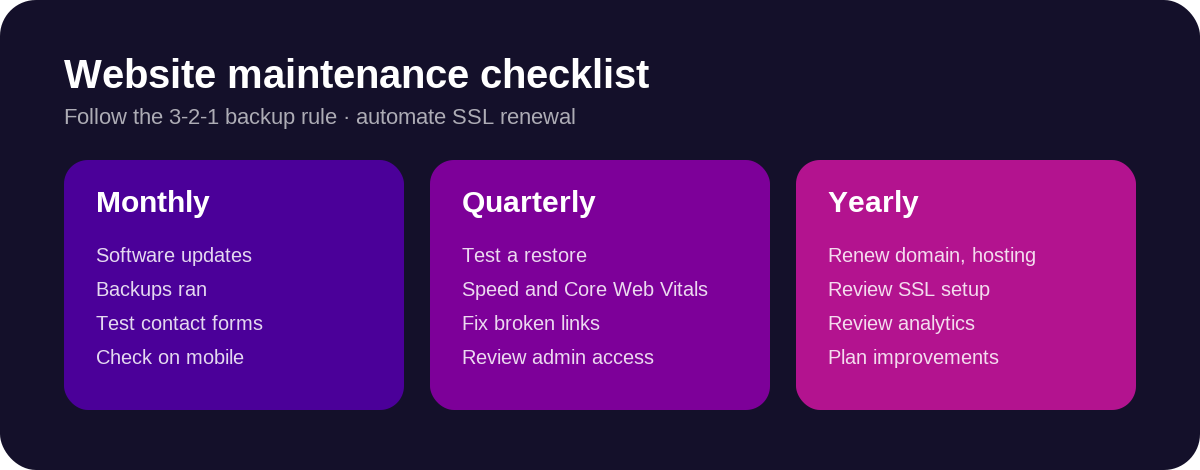
A good website maintenance routine covers updates, backups, security, speed, forms and content. Monthly: update the CMS, themes and plugins, confirm backups run and test contact forms. Quarterly: test a backup restore, check speed and broken links, review admin access and refresh content. Yearly: renew the domain and hosting early, review your SSL setup and plan improvements. Follow the 3-2-1 backup rule and automate SSL renewal, because certificate lifetimes are getting shorter.
Monthly: updates, backup check, form test, quick mobile check.
Quarterly: test a restore, speed, broken links, admin access, content refresh.
Follow the 3-2-1 backup rule and automate SSL certificate renewal.
A website isn't finished at launch. Software needs updates, backups need checking, forms can quietly stop working and content goes out of date. A simple routine, done monthly, quarterly and yearly, prevents most problems before customers notice them.
Use this checklist yourself, or hand it to whoever looks after your site.
Maintenance at a glance
Monthly (30 to 60 minutes)
Update software: your CMS (such as WordPress), themes, plugins and any server software you manage. Update on a staging copy first for larger sites.
Confirm backups ran and are stored somewhere other than the website's own server.
Test every contact form and WhatsApp or call buttons: send a test enquiry and check it arrives.
Check key pages on a phone: home, main service pages, contact.
Scan for security warnings from your host, security plugin or Google Search Console.
Check uptime alerts if you use a monitoring service.
Quarterly (2 to 3 hours)
Test a restore. A backup you've never restored is a hope, not a plan. CISA's guidance for businesses pairs backups with regular restore testing.
Check speed and Core Web Vitals in PageSpeed Insights and Search Console. See Core Web Vitals explained.
Fix broken links and redirect any pages you've removed.
Review admin access: remove old staff, agencies and freelancers; make sure every admin uses a strong password and two-factor authentication.
Refresh content: prices, services, team photos, opening hours, offers and portfolio.
Check Search Console for indexing errors and new issues.
Yearly
Renew your domain well before expiry, and keep auto-renew on. See how to choose a domain name for ownership tips.
Renew hosting and review whether it still fits your traffic.
Review your SSL setup. Under CA/Browser Forum rules, public TLS certificates issued from 15 March 2026 can last at most 200 days, falling to 100 days from March 2027 and 47 days from March 2029. Make sure renewal is automated.
Review analytics: which pages bring enquiries, which get ignored.
Plan improvements: new pages, better calls to action, accessibility fixes or a redesign if the site no longer fits the business.
on 2 different types of storage (for example, a hard drive and the cloud)
with 1 copy off-site
For websites, that usually means your host's backups plus an automatic copy to separate cloud storage, with at least one copy kept long enough to roll back after a problem you notice late.
Security basics
Keep software up to date; most attacks exploit known, already-fixed weaknesses.
Remove unused plugins and themes.
Use strong, unique passwords and two-factor authentication for every admin.
Limit who has admin access, and give agencies their own logins you can revoke.
Small, simple sites with someone comfortable following a checklist
Your developer or agency, on a monthly plan
Business sites where enquiries matter and nobody has time
Managed hosting
Covers server-side updates and backups, but not your content, forms or plugins
Whoever does it, ask for a short monthly note of what was updated, backed up and checked.
The bottom line
Monthly updates and backup checks, quarterly restore tests and reviews, and yearly renewals keep your website secure, fast and reliable. Follow the 3-2-1 backup rule, automate SSL renewal and never let your domain lapse.
Do light checks monthly (updates, backups, forms), deeper checks quarterly (restore test, speed, links, access) and a review yearly (renewals, SSL, analytics and next improvements).
What is the 3-2-1 backup rule?
+
Keep three copies of important data, on two different types of storage, with one copy kept off-site. CISA recommends it for businesses, together with testing that backups can be restored.
How long does an SSL certificate last?
+
Public TLS certificates issued from 15 March 2026 can be valid for at most 200 days, dropping to 100 days from March 2027 and 47 days from March 2029, under CA/Browser Forum rules. Automated renewal avoids expiry surprises.
Do I need maintenance if my website isn't on WordPress?
+
Yes. Every site needs backups, security updates for its software and hosting, SSL, form checks and content updates, even if there are fewer plugins to manage.
What happens if I skip website maintenance?
+
Outdated software can be exploited, forms can silently stop working, the site can slow down, and an expired domain or certificate can take the site offline. Most of these are cheap to prevent and expensive to fix.
Articles are written and reviewed by the Incinc Media team, the people who plan, design, build and market websites, apps and campaigns for businesses from our head office in Mumbai and our branch offices in Faridabad and Greater Noida. We write about the questions clients ask us every week.
Most small-business websites are not hacked by clever attackers, but through old plugins, weak passwords and no backups. Here are the basics that prevent most problems.
Your domain is your address online for years, so it's worth choosing carefully. Here's how to pick one that's easy to remember, right for your market and fully owned by you.
Read
Start a project
Telluswhat you'rebuilding.
Whether you need a digital product, a creative campaign or a complete digital transformation, let's build something meaningful together.