
SEO & AI Search · 2 min read
Google Business Profile: A Checklist for Local Businesses in Mumbai
For many customers, your Google listing is the first thing they see. A complete, active profile makes it easier to be found and chosen.
Read
Reviews help customers choose you and help your local ranking. Here's how to get more of them consistently, and the shortcuts that can get your Business Profile restricted.
Quick answer
To get more Google reviews, make it easy and ask consistently: copy your review link or QR code from your Google Business Profile, send it to every customer at the moment they're happiest (by WhatsApp, SMS, email or a printed card), and reply to every review. Google says more reviews and positive ratings can help local ranking. Never offer discounts, gifts or payment for reviews, and don't ask only happy customers; Google prohibits incentives and selective solicitation and can restrict profiles that break the rules.
To get more Google reviews, share your review link or QR code with every customer at the moment they're happiest, make leaving a review take seconds, and reply to every review you receive. Google says more reviews and positive ratings can help your local ranking, and reviews are often what makes someone call you instead of a competitor.
What you must not do: offer anything in return for a review, or ask only the customers you think are happy. Both break Google's policies, and Google can restrict profiles that break them.
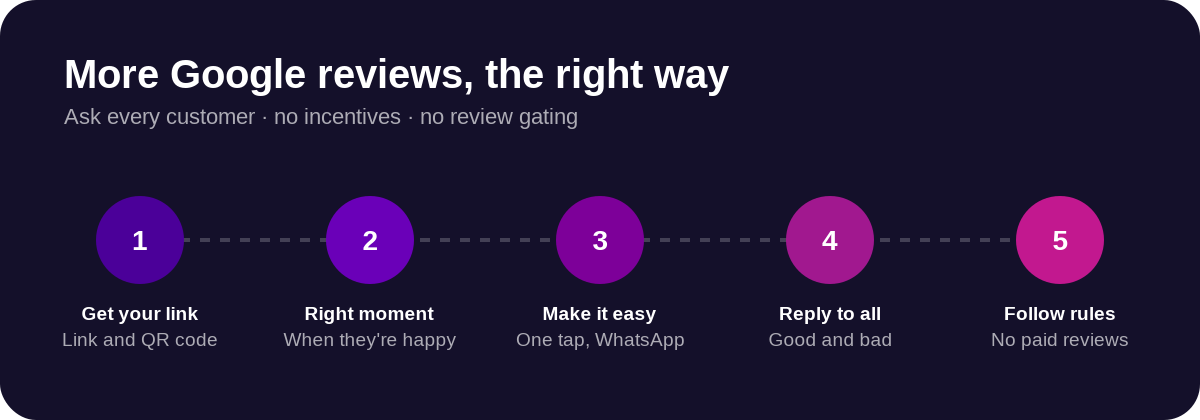
In your Google Business Profile, use the option to ask for reviews. You'll get a short link and a QR code that open the review box directly. Google's tips to get more reviews describe sharing this link or QR code with customers.
Save the link somewhere your team can reach it quickly, such as a WhatsApp quick reply.
Timing matters more than wording. Ask when the customer has just experienced the value:
| Business | Good moment to ask |
|---|---|
| Clinic or salon | Right after the appointment, while they're still pleased |
| Restaurant or café | When the bill is settled, with a table card or receipt QR |
| Service business | Once the job is complete and approved |
| Online store | A few days after delivery, once they've used the product |
| B2B or agency | After a milestone or successful launch |
One tap: send the link directly. Don't ask people to search for your business.
Keep the message short:
Thanks for choosing us today! If you have a minute, we'd really value your honest review on Google: [your link]
Use the channels customers already use: WhatsApp, SMS, email, invoices and your website. You can create a pre-filled WhatsApp message with our free WhatsApp link generator.
Offline: print the QR code on counter cards, receipts, packaging and visiting cards.
Ask everyone the same way. Make the request part of your normal process, not a one-off campaign.
If a review breaks Google's policies, for example spam, off-topic content or conflicts of interest, you can report it. Don't try to get it removed by offering something.
Google's prohibited and restricted content policy is clear. Don't:
Google can take action against profiles that break these rules, including temporarily stopping new reviews and unpublishing existing ones. A slower, genuine flow of reviews is worth far more than a burst of fake ones.
More Google reviews come from a habit, not a campaign: share your link with every customer at the right moment, make it effortless, reply to everything and never pay or filter. Over time, this builds a rating customers trust and a profile Google sees as prominent.
Our SEO team sets up and manages Google Business Profiles for local businesses. Start with our Google Business Profile checklist, then see the full local SEO guide for Mumbai businesses.
Sign in to your Google Business Profile, then use the option to ask for reviews to copy your review link or download a QR code. Share that link by WhatsApp, SMS, email, your website or a printed card.
No. Google prohibits offering incentives such as payment, discounts or free goods or services in exchange for a review. It also prohibits rewarding someone for removing or changing a negative review.
No. Google doesn't allow businesses to selectively solicit positive reviews or discourage negative ones. Send the same request to every customer.
Google says local results are based mainly on relevance, distance and prominence, and that more reviews and positive ratings can help your local ranking. Reviews also strongly influence whether people choose you.
Reply calmly and helpfully, acknowledge the issue and offer to resolve it offline. If a review breaks Google's policies, such as spam or off-topic content, you can report it for review. Don't offer incentives to have it removed.
Written by
Articles are written and reviewed by the Incinc Media team, the people who plan, design, build and market websites, apps and campaigns for businesses from our head office in Mumbai and our branch offices in Faridabad and Greater Noida. We write about the questions clients ask us every week.
Want a steady flow of genuine reviews?
We'll set up your Google Business Profile, review link, QR materials and a simple follow-up process that fits how you serve customers.
SEO & AI Search · 2 min read
For many customers, your Google listing is the first thing they see. A complete, active profile makes it easier to be found and chosen.
SEO & AI Search · 7 min read
When someone searches 'near me' in Mumbai, three to four businesses get the map spots and most of the calls. Here's how Google picks them, and a practical plan to become one of them.
Business Growth & Technology · 2 min read
Your customers are already on WhatsApp. A few simple settings can turn it into an organised, professional sales channel.
Start a project
Whether you need a digital product, a creative campaign or a complete digital transformation, let's build something meaningful together.
Or call +91 81081 14819·mail@incincmedia.com