
SEO & AI Search · 2 min read
Google Business Profile: A Checklist for Local Businesses in Mumbai
For many customers, your Google listing is the first thing they see. A complete, active profile makes it easier to be found and chosen.
Read
When someone searches 'near me' in Mumbai, three to four businesses get the map spots and most of the calls. Here's how Google picks them, and a practical plan to become one of them.
Quick answer
Google ranks local results mainly on relevance (how well your profile matches the search), distance (how close you are to the searcher) and prominence (how well known and well reviewed you are). To improve local visibility in Mumbai, verify and fully complete your Google Business Profile, choose accurate categories, earn genuine reviews and reply to them, keep your name, address and phone consistent everywhere, and publish location-specific pages on your website.
Search "chartered accountant near me" in Andheri, "dentist in Ghatkopar" or "interior designer Powai" and Google shows a map with a few highlighted businesses before any website. Those businesses get a large share of the calls, direction requests and website visits for that search.
Local SEO is the work of getting your business into that group, and staying there. This guide explains how Google chooses local results, then walks through a practical plan we use with businesses across Mumbai.
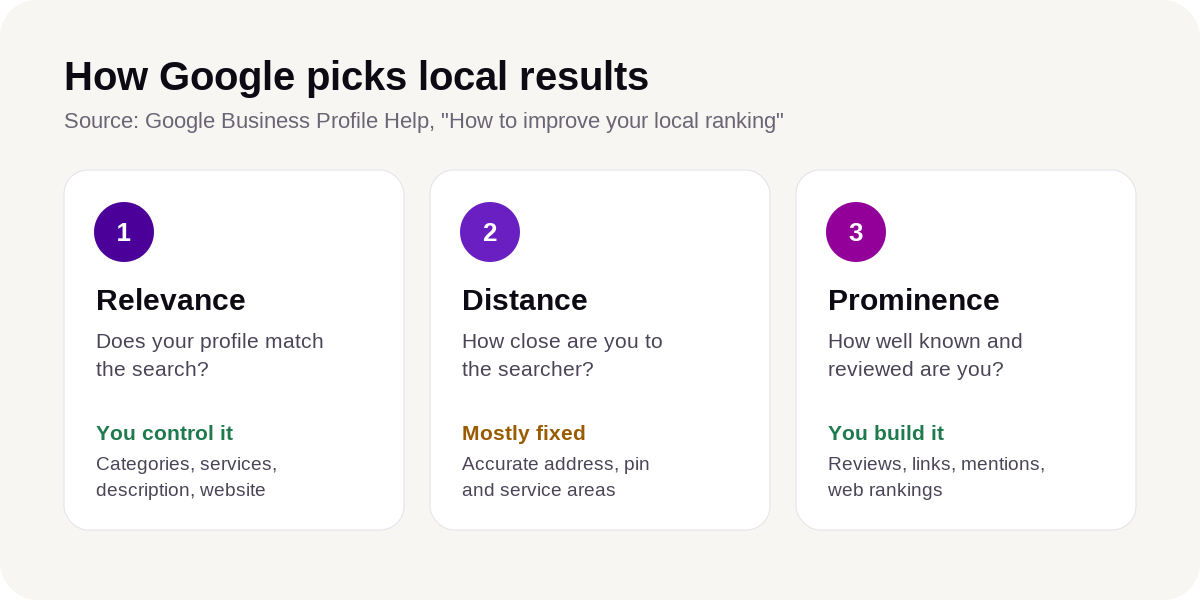
Google's own help page, How to improve your local ranking on Google, says local results are based mainly on three factors:
| Factor | What it means | Can you influence it? |
|---|---|---|
| Relevance | How well your profile matches what someone searched for | Yes: categories, services, descriptions, website content |
| Distance | How far your business is from the searcher, or the location in the search | Not directly, short of opening in a new location |
| Prominence | How well known your business is, based on reviews, links, articles and directories | Yes: reviews, local links, mentions, a strong website |
Google also notes that your position in regular web results contributes to prominence, so ordinary SEO best practices apply to local SEO too.
In a city as dense as Mumbai, distance can be measured in a few hundred metres. A searcher in Vikhroli and a searcher in Bandra may see completely different results for the same words. You can't move closer to every customer, so the game is to be the most relevant and most prominent business near them.
If you haven't already, create or claim your profile at Google Business Profile and complete verification. Google says verified businesses are more likely to show up in local results, because verification confirms you're authorised to represent the business.
Before going further, read Google's guidelines for representing your business. The most common reasons we see Mumbai profiles suspended are:
Complete profiles match more searches. Add:
Our Google Business Profile checklist has a quick version of this list.
Google states that review count and rating feed into prominence, and reviews are often what makes someone choose one listing over another.
A steady trickle of genuine reviews beats a sudden burst.
Your website is where Google and customers confirm what your profile says.
If you serve several distinct areas, a location page can help, but only when it has genuinely useful local content: directions, the team at that branch, photos and local projects. Copy-pasted pages with only the area name changed are thin content and rarely help.
Customers and search engines find your business on many sites: JustDial, IndiaMART, Sulekha, industry directories, Facebook, Instagram, LinkedIn, Bing Places and Apple Business Connect. Inconsistent names, old phone numbers or previous addresses create confusion.
Prominence comes from being known. Practical ways to build it:
Keep your profile active:
Activity alone won't outrank a more relevant business, but an up-to-date profile converts better.
In your Business Profile performance view, track searches, calls, direction requests and website clicks. In Google Search Console, track impressions and clicks for local-intent queries such as "[service] in [area]" or "[service] near me". Most importantly, ask new customers how they found you. Local SEO is working when calls and walk-ins grow, not just when rankings change.
| Week | Focus |
|---|---|
| 1 | Verify the profile; fix name, primary category, address pin, hours and phone |
| 2 | Add services, description, attributes and 15 to 20 genuine photos |
| 3 | Align your website's contact details, add LocalBusiness schema, improve the main service page |
| 4 | Start a review routine; claim and correct the top directory listings for your industry |
Local SEO in Mumbai isn't a trick. It's being accurate, complete, genuinely reviewed and well represented on your own website, consistently, over time. Google's three factors make the priorities clear: you can't control distance, so become the most relevant and most trusted option near your customers.
If you'd like help, our SEO team can audit your profile and website and set up a local SEO plan for your area. For the wider picture of how search is changing with AI answers, read SEO vs AEO vs GEO. If you're hiring help, read how to choose an SEO company in Mumbai. To build your rating steadily, follow our guide on getting more Google reviews. If many of your customers prefer Marathi or Hindi, see multilingual websites in India.
Fixes such as correcting categories, completing the profile and verifying the business can have an effect within weeks. Building reviews, links and local content is ongoing and compounds over months.
Map results lean heavily on distance, so ranking far from your address is difficult. Service-area businesses can list the areas they serve, and location-specific pages on your website can help you appear in regular web results for those areas. Don't create fake addresses: it violates Google's guidelines and can get a profile suspended.
Google states that review count and score factor into local ranking, and that more reviews and positive ratings can improve it. Reviews also strongly influence whether people choose you. Only ask for genuine reviews; never buy them or offer incentives.
No. Your Business Profile name should match your real-world business name, as on your signage and documents. Adding keywords or locations that aren't part of the real name is against Google's guidelines and can lead to suspension.
No. It also includes your website's local pages, consistent business details across directories, local links and mentions, and your profile on platforms like Bing Places and Apple Business Connect.
Written by
Articles are written and reviewed by the Incinc Media team, the people who plan, design, build and market websites, apps and campaigns for businesses from our head office in Mumbai and our branch offices in Faridabad and Greater Noida. We write about the questions clients ask us every week.
Want more calls from Google Maps?
We'll audit your Google Business Profile, website and local presence, and give you a prioritised local SEO plan for your area of Mumbai.
SEO & AI Search · 2 min read
For many customers, your Google listing is the first thing they see. A complete, active profile makes it easier to be found and chosen.

SEO & AI Search · 9 min read
AI answers are changing how people search, and a wave of new acronyms has followed. Here's what SEO, AEO and GEO really mean, what has changed, and what hasn't.
SEO & AI Search · 2 min read
You don't need to be an expert to get the fundamentals right. These basics help customers find your services on Google.
Start a project
Whether you need a digital product, a creative campaign or a complete digital transformation, let's build something meaningful together.
Or call +91 81081 14819·mail@incincmedia.com