
App Development · 2 min read
Do You Need a Mobile App, or Is a Website Enough?
Apps are exciting, but they aren't always the right first step. Here's a practical way to decide.
Read
App quotes vary even more than website quotes, because an app is really three products: the app, the backend and the admin panel. Here's how to understand the price and avoid paying for features you don't need yet.
Quick answer
Mobile app development cost in India depends on the number of screens and features, whether you build for Android, iOS or both, the backend and admin panel behind the app, integrations such as payments and maps, design depth and testing. Budget separately for app store accounts (Google Play charges a one-time registration fee; Apple's developer programme is yearly), servers, third-party services, store commissions on digital sales and ongoing maintenance.
"How much will an app cost?" is a fair question with a frustrating answer: it depends on what the app does. A loyalty app with a points balance and offers is a very different build from a delivery app with live tracking, payments, rider apps and dispatch tools.
This guide explains what drives mobile app development cost in India, the costs that continue after launch, and how to scope a first version that's affordable without being useless.
An app is worth building when people will use it often, need features a website can't offer well (offline use, notifications, camera, location tracking), or when it's central to how your business operates, such as field staff, deliveries or bookings. If customers visit occasionally, a fast mobile website is usually cheaper and easier to find. Our guide Do you need a mobile app, or is a website enough? helps you decide.
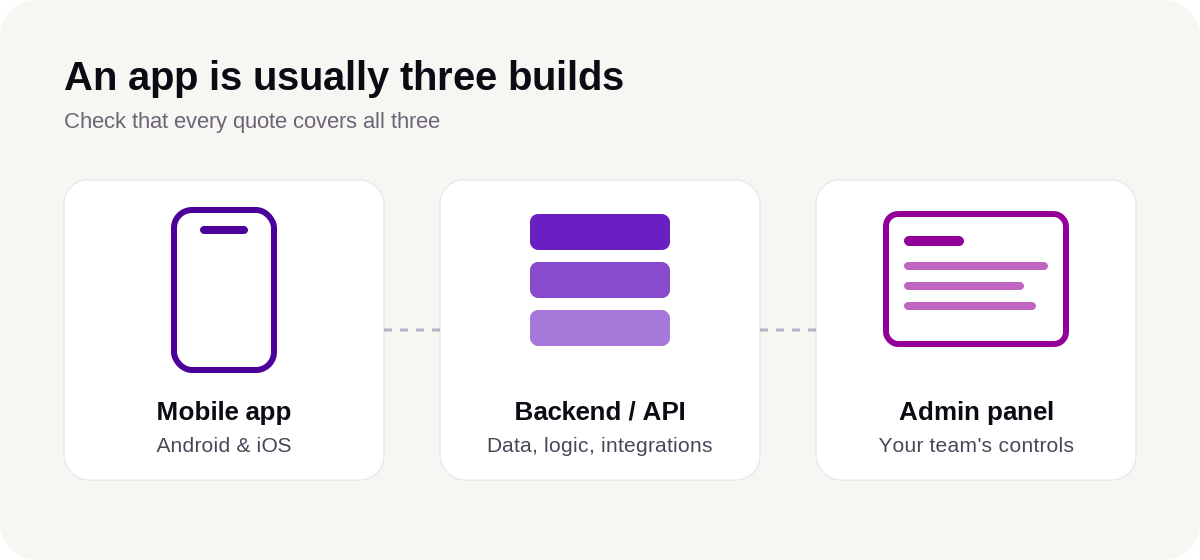
Most business apps are three connected pieces of software:
| Part | What it does | Examples |
|---|---|---|
| Mobile app | What users install on Android and iOS | Screens, login, catalogue, cart, bookings, notifications |
| Backend / API | Stores data and runs the business logic | Users, orders, availability, payments, integrations |
| Admin panel | Where your team manages everything | Approving orders, editing products, sending notifications, reports |
When two quotes differ wildly, check whether both include all three. Some quotes cover only the app screens.
Every feature adds design, development and testing. Common features, roughly from simpler to more involved:
The jump from one user type to several (for example, a customer app plus a delivery partner app) is one of the biggest cost multipliers.
Using standard interface patterns is faster. A custom-branded design with illustrations, animations and many unique screens costs more, though it can matter a lot for consumer apps where first impressions decide retention.
Simple apps can run on managed services. Apps with complex rules, high traffic, real-time features or heavy integrations need more backend engineering and more careful infrastructure.
Testing across different phones, screen sizes and Android versions takes time. In India, where many users have budget and mid-range Android phones, testing on real lower-end devices is worth doing.
Preparing store listings, screenshots, privacy disclosures and passing review on both stores is real work, especially for apps that collect personal data or take payments.
| Recurring cost | Notes |
|---|---|
| Google Play developer account | One-time registration fee (US$25 at the time of writing, per Google Play Console Help) |
| Apple Developer Program | Yearly membership (US$99 per year, per Apple) |
| Servers and database | Grows with users and data |
| Third-party services | SMS/OTP, maps, push notifications, email, analytics, payment gateway fees |
| Store commissions | Apply to digital goods and subscriptions sold in-app. Google Play charges a reduced 15% service fee on a developer's first US$1 million of earnings each year (Google); Apple offers 15% to qualifying developers through its Small Business Program. Physical goods and real-world services usually use your own payment gateway instead. |
| Maintenance | Bug fixes, security updates, updates for new Android and iOS versions, library upgrades |
| New features | Most successful apps keep improving after launch |
Store policies and fees change; check the official pages before you budget.
A minimum viable product is the smallest version that delivers real value to real users. Write down:
Launching a focused app, learning from real usage and then investing in the right features is almost always cheaper than building everything upfront.
Use proven services for login, payments, maps, notifications and analytics instead of building them from scratch. If you already have a website with a product catalogue or booking system, the app can often share its backend.
A clickable prototype lets you and a few customers try the flows before development starts. Changing a prototype takes hours; changing a built app takes weeks.
App cost follows scope: the number of features and user types, the platforms, the backend and the quality bar. Get quotes that cover the app, backend and admin panel against the same written scope, start with a focused version one, and plan for yearly running costs from the start.
Our mobile app development team can help you define that first version and give you an itemised estimate. If you're also planning a website, see our guide to website development cost in India. When the app is ready, follow our Play Store and App Store publishing checklist.
It can be, if most of your users are on Android, which is common for consumer apps in India. With cross-platform development, though, adding iOS later often costs much less than building it separately, so compare both options before deciding.
A focused first version of a business app commonly takes a few months from approved designs to store launch; complex apps take longer. Store review, testing and content readiness also affect the date.
Google Play charges a one-time developer registration fee (US$25 at the time of writing) and Apple's Developer Program is a yearly membership (US$99 per year). Both stores also take a commission on digital goods and subscriptions sold in the app; physical goods and services usually use your own payment gateway.
Almost always. It's where your team manages users, orders, content, notifications and reports without asking a developer.
Servers and databases, third-party services (SMS, maps, notifications, payments), store memberships, bug fixes, updates for new Android and iOS versions, and new features.
Written by
Articles are written and reviewed by the Incinc Media team, the people who plan, design, build and market websites, apps and campaigns for businesses from our head office in Mumbai and our branch offices in Faridabad and Greater Noida. We write about the questions clients ask us every week.
Planning an app?
We'll help you define a focused first version, choose the right technology and give you an itemised estimate for the app, backend and admin panel.
App Development · 2 min read
Apps are exciting, but they aren't always the right first step. Here's a practical way to decide.
Website Development · 10 min read
Two quotes for 'a website' can differ by ten times, and both can be fair. Here's what actually drives the price, what you'll pay every year after launch, and how to compare quotes properly.
Business Growth & Technology · 2 min read
Off-the-shelf tools are a great start. Here are the signs your business has outgrown them, and what to consider before building.
Start a project
Whether you need a digital product, a creative campaign or a complete digital transformation, let's build something meaningful together.
Or call +91 81081 14819·mail@incincmedia.com