How to Choose a Payment Gateway for Your Website in India
Every online payment in India passes through a payment gateway. The right one keeps checkout smooth and fees predictable. Here's what to compare before you sign up.
To choose a payment gateway for your website in India, check that the provider is a bank or an RBI-authorised payment aggregator, compare the total cost (per-transaction fee plus 18% GST on the fee, and any setup, annual or international charges), confirm it supports the payment methods your customers use (UPI, cards, net banking, wallets, EMI, international cards), check settlement time and KYC requirements, make sure it integrates with your platform, and test refunds and support. Compare at your expected monthly volume, not just the headline rate.
Use a bank or an RBI-authorised payment aggregator.
Compare total cost: fee plus 18% GST on the fee, plus any extra charges.
Match payment methods to your customers: UPI, cards, net banking, international.
Check settlement time, KYC documents, platform plugins and refund handling.
To choose a payment gateway for your website in India, use a bank or an RBI-authorised payment aggregator, compare the total cost at your expected volume, make sure it supports the payment methods your customers use, and check settlement time, KYC, platform integration and support. The headline rate is only one part of the decision.
Every online payment on your site passes through a gateway, so the right one keeps checkout smooth, money arriving on time and fees predictable. Here's what to compare.
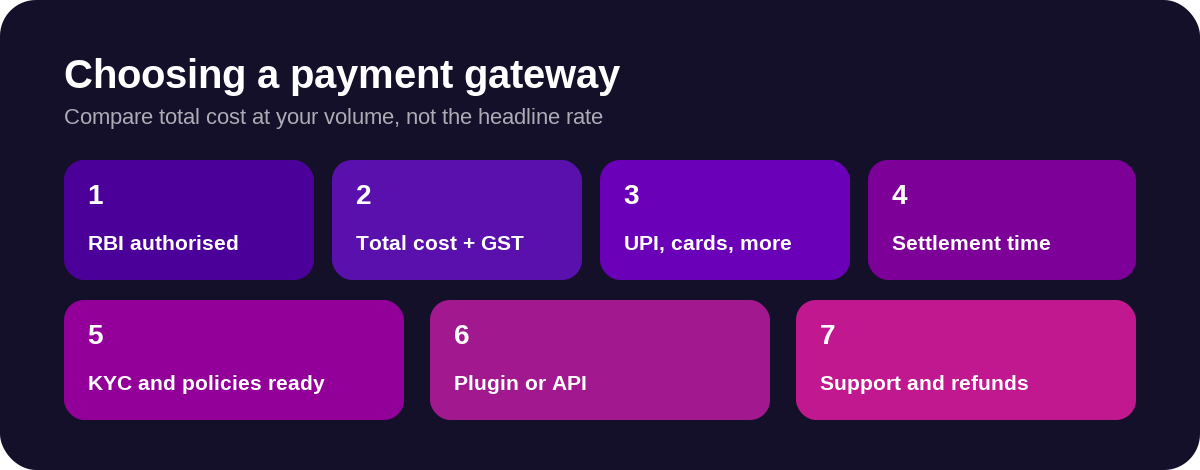
Seven checks before you sign up
1. Regulation: is the provider authorised?
In India, online payment aggregators are regulated by the Reserve Bank of India. RBI's Regulation of Payment Aggregators Directions, 2025 consolidate the rules: banks can run payment aggregation without separate authorisation, while non-bank companies need RBI authorisation. Choose a bank or a well-established, authorised provider so your customers' payments and your settlements are handled under these rules.
2. Total cost, not just the headline rate
Most gateways charge a percentage per transaction, and 18% GST applies to the fee, not the whole payment. For example, Razorpay's standard plan lists a 2% platform fee on domestic transactions plus GST on that fee, with no setup or annual charge (checked November 2026).
Compare:
Domestic transaction fee and any method-specific rates
International card fees and currency conversion
Setup, annual maintenance or minimum charges
Fees for instant settlement, refunds or chargebacks
Platform fees on top (Shopify adds its own transaction fee on third-party gateways; see our Shopify vs WooCommerce guide)
Work out the monthly cost at your expected sales, and ask about lower rates once your volume grows.
3. Payment methods your customers use
Check support for:
UPI, including QR and intent flows on mobile
Debit and credit cards (RuPay, Visa, Mastercard and others)
Net banking across major banks
Wallets and pay later or EMI if your average order is high
International cards if you sell abroad
Payment links and QR codes for WhatsApp and offline sales
A smooth mobile checkout with UPI usually matters most for Indian customers.
4. Settlement time
How quickly does money reach your bank? Many providers settle a couple of working days after the transaction, with faster or instant settlement for an extra fee. If cash flow is tight, compare settlement cycles carefully.
5. KYC and onboarding
Gateways must verify your business before going live. Typically you'll need:
PAN and business registration documents
Bank account details in the business's name
A live website with clear pricing, contact details, terms, privacy, refund and shipping policies
GST details where applicable
Prepare these before applying; missing policy pages are a common reason for delays. Our Shopify setup checklist covers the pages most stores need.
6. Integration with your website or app
Plugins for your platform (Shopify, WooCommerce and others) save development time.
APIs and SDKs for custom websites and mobile apps.
Webhooks so orders update automatically when payment succeeds or fails.
Subscriptions if you sell recurring plans.
Test mode to try payments before going live.
7. Support, refunds and dashboard
Easy refunds (full and partial) from the dashboard
Clear reports that match your accounting
Dispute and chargeback handling
Responsive support when payments fail during a sale
A simple comparison checklist
Bank or RBI-authorised payment aggregator
Total monthly cost at your volume, including GST and extras
UPI, cards, net banking and any methods you need
Settlement cycle that suits your cash flow
KYC documents and website policies ready
Plugin or API for your platform, with test mode
Refunds, reports and support checked
The bottom line
Choose a payment gateway by regulation, total cost, payment methods, settlement, onboarding, integration and support, not by the lowest headline rate alone. Test the full checkout on mobile before launch, including a refund.
A service that securely collects online payments on your website or app (UPI, cards, net banking, wallets) and settles the money to your bank account, minus its fees.
How much do payment gateways charge in India?
+
Most charge a percentage per transaction, with 18% GST on that fee, and some add setup, annual or international charges. For example, Razorpay's standard plan lists a 2% platform fee on domestic transactions plus GST on the fee. Always check current pricing for your business.
Do I need GST registration to get a payment gateway?
+
Requirements vary by provider and business type. Gateways need KYC such as PAN, bank details and business documents, and a live website with policies. Ask the provider and your accountant about GST in your case.
How long does settlement take?
+
It depends on the provider and plan. Many offer settlement a couple of working days after the transaction, with faster or instant settlement for an extra fee. Check the settlement cycle before you sign up.
Can I accept international payments?
+
Many Indian gateways support international cards, usually at a higher fee than domestic payments and with additional checks. Confirm currencies, fees, documentation and settlement for international payments separately.
Articles are written and reviewed by the Incinc Media team, the people who plan, design, build and market websites, apps and campaigns for businesses from our head office in Mumbai and our branch offices in Faridabad and Greater Noida. We write about the questions clients ask us every week.
Setting up Shopify in India has a few steps that global guides skip: Shopify Payments isn't available, GST settings need manual review, and invoices need an app. Here's the full checklist, in order.
The build is only part of an online store's cost. Payment fees, platform charges, apps, shipping tools and marketing decide whether the store makes money. Here's the full picture before you commit.
Both platforms run thousands of successful Indian stores. The right one depends on your team, catalogue and growth plans, and on fees many sellers don't notice until their first statement.
Read
Start a project
Telluswhat you'rebuilding.
Whether you need a digital product, a creative campaign or a complete digital transformation, let's build something meaningful together.