Website Accessibility Basics: A Practical WCAG Checklist for Businesses
An accessible website works for people who use screen readers, keyboards, zoom or captions, and it usually works better for everyone else too. Here's what to check and fix first.
Website accessibility means people with disabilities can perceive, understand, navigate and use your site, including with screen readers, keyboards, zoom and captions. The widely used standard is WCAG 2.2, and level AA is the usual target. Start with the basics: text alternatives for images, sufficient colour contrast (4.5:1 for normal text), full keyboard access with visible focus, clear headings and labels, captions for videos, and tap targets at least 24 by 24 CSS pixels. Test with automated tools and real keyboard and screen-reader checks.
WCAG 2.2 level AA is the common target for business websites.
Quick wins: alt text, contrast, keyboard access, form labels, headings and captions.
Automated tools catch only some issues; test with a keyboard and a screen reader too.
Accessibility is increasingly a legal expectation in India, the EU and elsewhere.
Website accessibility means people with disabilities can use your website: seeing or hearing its content, understanding it, navigating it and completing tasks like enquiries or purchases. That includes people who use screen readers, navigate with a keyboard, zoom text, rely on captions or have limited dexterity. It also helps older visitors, people on small screens and anyone in bright sunlight or a noisy room.
The widely used standard is the W3C's Web Content Accessibility Guidelines (WCAG) 2.2, and level AA is the usual target for business websites. This guide gives you a practical checklist to start with.
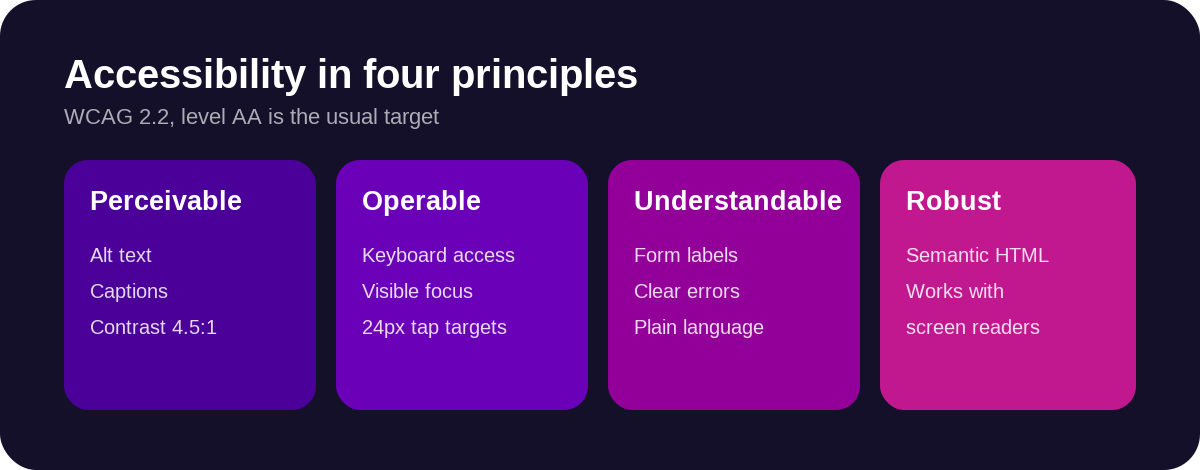
WCAG's four principles
Why accessibility matters for your business
More customers. Many people live with a disability, and many more have age-related changes in vision, hearing or dexterity. If they can't use your site, they'll use a competitor's.
Legal expectations are rising. In India, the Rights of Persons with Disabilities Act, 2016 sets accessibility duties, and in 2025 the Supreme Court held that digital access is part of the right to life under Article 21. In the EU, the European Accessibility Act has applied since 28 June 2025 to services such as consumer e-commerce, with an exemption for microenterprises providing services.
Better for everyone. Clear headings, readable contrast, proper labels and captions improve usability, conversions and search visibility.
WCAG in plain English: four principles
Perceivable: people can see or hear the content (alt text, captions, contrast).
Operable: people can use every control (keyboard access, enough time, no flashing).
Understandable: content and forms are clear and predictable (labels, error messages, plain language).
Robust: the site works with assistive technologies (valid, semantic code).
The practical checklist
Images and media
Alt text on informative images that says what the image shows or does. Decorative images get empty alt text so screen readers skip them.
Captions on videos with speech, and transcripts for audio.
No auto-playing audio, and a way to pause moving content.
Colour and text
Contrast of at least 4.5:1 for normal text and 3:1 for large text (WCAG 1.4.3).
Don't rely on colour alone to convey meaning, such as red for errors. Add text or icons.
Text can be zoomed to 200% without content being cut off or overlapping.
Keyboard and focus
Everything works with a keyboard: menus, sliders, pop-ups, forms and checkout.
A visible focus indicator shows where you are on the page.
No keyboard traps: you can tab into and out of every component.
Pop-ups and modals can be closed with Escape and return focus sensibly.
Structure and navigation
One H1 per page and logical headings (H2, H3) that describe sections.
Descriptive link text: "View pricing", not "Click here".
A skip link to jump to the main content.
The page language is set in the code.
Forms
Every field has a visible label, not just placeholder text.
Clear error messages that say what went wrong and how to fix it.
No CAPTCHA that blocks people; WCAG 2.2 adds requirements for accessible authentication.
Touch and mobile
Tap targets at least 24 by 24 CSS pixels, or spaced enough apart. This is a new WCAG 2.2 criterion, Target Size (Minimum).
Works in both orientations and doesn't require complex gestures.
What's new in WCAG 2.2
WCAG 2.2 added criteria that matter for modern sites, including focus not being hidden behind sticky headers, minimum target size, alternatives to dragging, consistent help, not asking for the same information twice and accessible authentication. See the W3C's summary of what's new in WCAG 2.2.
How to test your website
Automated scan: tools like Lighthouse (in Chrome DevTools) or WAVE flag missing alt text, low contrast and missing labels. They catch only part of the issues.
Keyboard test: unplug the mouse and try to use the menu, complete a form and close a pop-up using Tab, Shift+Tab, Enter, Space and Escape.
Screen-reader test: try NVDA (Windows), VoiceOver (Mac and iPhone) or TalkBack (Android) on your key pages.
Zoom test: zoom to 200% and check nothing breaks.
Real users: where possible, ask people who use assistive technology for feedback.
Avoid accessibility overlays as a fix
Plugins that promise "instant compliance" with a widget can't fix missing labels, poor structure or inaccessible custom components, and can interfere with users' own assistive tools. Fix the underlying design and code.
The bottom line
Accessibility makes your website usable by more people, reduces legal risk and improves the experience for everyone. Target WCAG 2.2 AA, start with alt text, contrast, keyboard access, labels, headings and captions, and test with both tools and real interaction.
The Web Content Accessibility Guidelines, published by the W3C. WCAG 2.2 is the current version, with success criteria at three levels: A, AA and AAA. Most organisations aim for level AA.
Is website accessibility a legal requirement in India?
+
The Rights of Persons with Disabilities Act, 2016 sets accessibility duties, and government websites follow the Guidelines for Indian Government Websites. In 2025 the Supreme Court held that digital access is part of the right to life under Article 21. Requirements for private businesses depend on your sector, so take legal advice for your case.
Do I need to worry about accessibility if I sell to Europe?
+
Possibly. The European Accessibility Act has applied since 28 June 2025 and covers services such as e-commerce for consumers in the EU, with an exemption for microenterprises providing services. Check how it applies to your business.
Can an accessibility plugin or overlay make my site compliant?
+
Not on its own. Overlays can't fix underlying problems like missing labels, poor structure or inaccessible custom components. Fix the site's code and content instead.
Does accessibility help SEO?
+
Indirectly. Descriptive alt text, clear headings, meaningful link text and captions help search engines understand your content, and a more usable site keeps visitors engaged. Accessibility isn't a direct ranking factor, but the practices overlap.
Articles are written and reviewed by the Incinc Media team, the people who plan, design, build and market websites, apps and campaigns for businesses from our head office in Mumbai and our branch offices in Faridabad and Greater Noida. We write about the questions clients ask us every week.
Most websites don't fail loudly. They load a little slowly, hide the phone number, say nothing specific, and visitors leave. Here are the ten mistakes we see most, and how to fix each one.
Core Web Vitals are Google's three measures of how a page feels to real visitors: how fast it loads, how quickly it responds and how stable it stays. Here's what each one means and how to fix it.