How to Do a Website Content Audit (Keep, Improve, Merge or Remove)
Older websites collect thin, outdated and duplicate pages that dilute everything else. A content audit decides what to keep, improve, merge or remove, and how to do it without losing search traffic.
A website content audit lists every page, checks how each performs (search clicks, impressions, enquiries) and how good it is (accurate, useful, up to date), then decides one action per page: keep, improve, merge into a stronger page, or remove. Use 301 redirects when content moves or is merged, and return 404 or 410 for pages removed with no replacement. Use Search Console's Performance and Page indexing reports to find weak pages, and repeat the audit every six to twelve months.
Inventory every page, then score each on performance and quality.
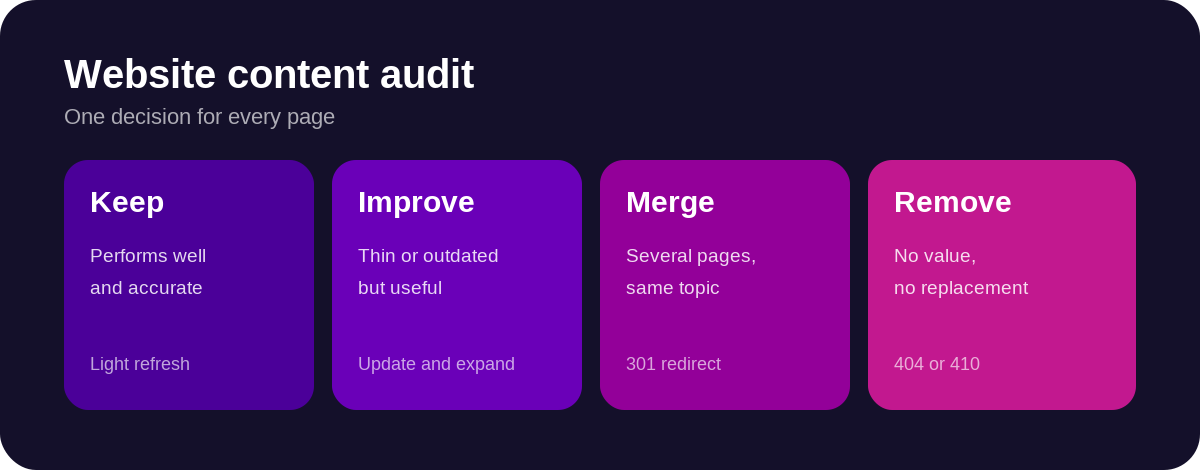
Four actions: keep, improve, merge or remove.
301 redirect merged or moved pages; 404 or 410 for removed pages with no replacement.
Don't redirect everything to the home page; Google may treat that as a soft 404.
A website content audit lists every page on your site, checks how it performs and how good it is, and decides one action for each: keep, improve, merge or remove. Done well, it makes your best pages stronger, removes clutter and helps search engines focus on what matters, without losing traffic.
Older websites collect thin pages, outdated offers, duplicate service pages and blog posts nobody reads. Here's how to clean them up step by step.
Keep, improve, merge or remove
Step 1: List every page
Build a spreadsheet of all URLs. Sources:
Your XML sitemap (usually yoursite.com/sitemap.xml)
Your CMS page and post lists
Search Console's Pages report for URLs Google knows about
Add columns for: URL, title, type (service, blog, location, product), last updated, and the main topic or keyword.
Step 2: Add performance data
For each URL, add from the last 12 months:
Search clicks and impressions from Search Console's Performance report (Pages tab)
Enquiries or conversions from Google Analytics key events
Many important pages marked "Crawled - currently not indexed" can be a sign of thin or duplicate content. Google notes the status doesn't always mean there's a problem, but patterns are worth investigating.
Step 3: Judge quality
Ask for each page:
Is it accurate and up to date (prices, services, team, dates)?
Does it answer a real question better than anything else on your site?
Is it unique, or does another page cover the same topic?
Does it have a clear next step for the reader?
Step 4: Decide one action per page
Action
When
What to do
Keep
Performs well and is accurate
Leave it; refresh small details
Improve
Has potential but is thin or outdated
Update facts, expand answers, add examples, improve title and description
Merge
Several pages cover the same topic
Combine the best parts into one page; 301 redirect the others to it
Remove
Outdated, useless and no replacement
Delete; let it return 404 or 410
Step 5: Handle URLs correctly
This is where audits go wrong:
Moved or merged content: use a 301 redirect to the new page. Google's crawling guidance treats a redirect as a strong signal that the target should be processed.
Removed with no replacement: let the page return 404 or 410. Google's guidance on crawling errors says this tells search engines the page doesn't exist.
Don't redirect everything to the home page. Google warns that redirecting many old URLs to an unrelated page can confuse users and may be treated as a soft 404.
Update internal links so they point straight to the final URLs, and update your sitemap.
Step 6: Improve what you keep
For pages marked "improve":
Put a direct answer near the top.
Update facts, prices and dates, and cite sources.
Add FAQs that real customers ask.
Improve the title and meta description so they match what people search.
Compare clicks, impressions and enquiries for the changed pages after a few months. Repeat the audit every six to twelve months, and always before a redesign or migration. If you're planning one, see website redesign or fix.
The bottom line
A content audit is housekeeping that pays: list every page, add performance and quality, then keep, improve, merge or remove. Redirect what moves, let removed pages return 404 or 410, and avoid mass redirects to the home page.
Our SEO team runs content audits with your Search Console data and handles redirects safely. For the technical side, see our technical SEO checklist.
Frequently asked questions
What is a website content audit?
+
A review of every page on your site to decide whether each one should be kept, improved, merged with similar pages or removed, based on performance data and content quality.
How often should I audit my website content?
+
Every six to twelve months for most business sites, and before any redesign or migration.
Should I delete old blog posts?
+
Only if they're outdated, inaccurate or no longer useful, and can't be improved. If a better page covers the same topic, merge the useful parts and 301 redirect the old URL to it.
What should a removed page return?
+
If the content is gone with no similar replacement, Google's guidance is to return a 404 or 410 status. If there is a clear replacement, use a 301 redirect to it.
What does 'Crawled - currently not indexed' mean?
+
Google crawled the page but chose not to index it. It doesn't always mean a problem, but many important pages in this status can point to thin or duplicate content worth improving or merging.
Articles are written and reviewed by the Incinc Media team, the people who plan, design, build and market websites, apps and campaigns for businesses from our head office in Mumbai and our branch offices in Faridabad and Greater Noida. We write about the questions clients ask us every week.
Most business blogs fail for one of two reasons: they answer questions nobody asks, or they answer them worse than everyone else. Here's a method that avoids both.
Great content can't rank if search engines can't crawl, understand and trust your pages. Use this checklist to find the technical issues that quietly hold business websites back.
A redesign is expensive and risky for your search rankings, and sometimes a handful of fixes would do more. Here's how to tell which one your website needs.
Read
Start a project
Telluswhat you'rebuilding.
Whether you need a digital product, a creative campaign or a complete digital transformation, let's build something meaningful together.