Why Your Google Ads Aren't Generating Leads (and How to Fix It)
When Google Ads don't bring leads, the problem is rarely 'Google Ads doesn't work for us'. It's usually tracking, search terms, the landing page or follow-up. Here's how to find which.
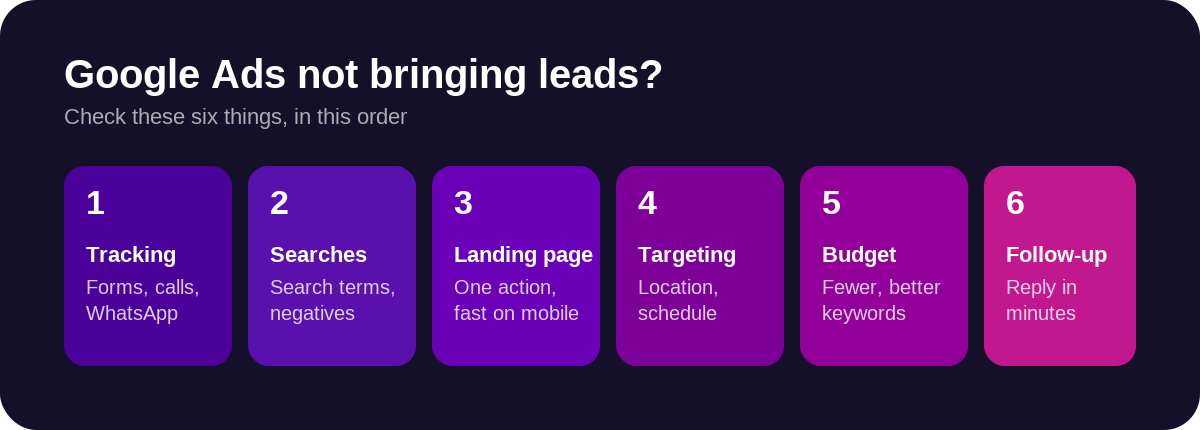
Google Ads usually fail to generate leads for six reasons: conversions aren't tracked correctly, ads show for irrelevant searches, the landing page doesn't convert, location or schedule settings are too broad, the budget is spread too thin, or leads aren't followed up quickly. Check them in that order: verify tracking, review the search terms report and add negative keywords, send ads to a focused landing page, tighten targeting, concentrate budget, and respond to enquiries fast.
Start with tracking: if conversions aren't measured, Google can't optimise and you can't judge results.
The search terms report shows what you actually paid for; negative keywords stop the waste.
Send ads to a focused landing page with one action, not your home page.
Slow follow-up turns good leads into lost leads.
"We tried Google Ads. It didn't work for our business." We hear this often, and when we look at the account, the cause is almost always fixable. The ads were showing for the wrong searches, sending people to a page that didn't convert, or the leads that did come in weren't tracked or followed up.
Here's how to diagnose it, in the order we check.
Six checks, in order
1. Is conversion tracking set up correctly?
If Google Ads doesn't know which clicks became enquiries, it can't optimise and you can't judge what's working.
Check that you track:
Form submissions, counted once on a thank-you page or confirmed submit event
Calls from ads and from your website
WhatsApp clicks, a major enquiry channel in India
No duplicates: the same lead isn't counted twice by Google Ads and GA4 imports
Google's guidance on what to track for your goals is a good starting point. Then submit a test enquiry and confirm it shows up.
2. What searches are you actually paying for?
Open the search terms report. It shows the real searches that triggered your ads, which are often wider than your keywords.
Common waste we find:
Job seekers ("vacancy", "salary", "internship")
DIY and free intent ("how to make", "free template")
Wrong service or product
Locations you don't serve
Fix: add these as negative keywords, and build shared negative lists so every campaign benefits. Review search terms weekly at first.
3. Are your keywords too broad or too generic?
"Website" or "marketing" attracts everyone. "Website development company in Mumbai" attracts buyers.
Fix: focus on high-intent keywords that include the service plus location, price or "company/agency/supplier". Use phrase and exact match until tracking is reliable. Google's keyword guidance covers match types.
4. Does the landing page convert?
Sending ads to your home page is one of the most common reasons for poor results. See landing page vs website for why ads usually need their own page.
A good landing page:
Matches the ad's promise in the headline
Has one clear action: call, WhatsApp or a short form
Location: check you're targeting people in your area, not just people interested in it, unless that's deliberate.
Radius: a local service rarely needs the whole state.
Schedule: if nobody answers the phone at night, consider pausing call-focused ads then.
Networks: Search campaigns with Display or partner networks switched on can spend on lower-intent placements.
6. Is the budget spread too thin?
A small budget across many keywords, locations and campaigns gets too few clicks anywhere to learn.
Fix: concentrate on your best service, your core area and your highest-intent keywords. Expand once those produce leads at an acceptable cost. Our Google Ads budget guide explains how to estimate what you need.
7. Are leads followed up quickly?
Sometimes the ads work and the leads go cold. A lead that waits a day has often already called a competitor.
Fix: respond within minutes during working hours, log every lead with its source, and review which campaigns bring customers, not just enquiries.
What about Quality Score?
Quality Score is a diagnostic, not a target. A low score points to weak ad relevance, expected click-through rate or landing page experience. Fix those and the score follows.
A one-hour account check
Submit a test enquiry and confirm it's recorded as a conversion.
Review the last 30 days of search terms and add negatives.
Check location settings and networks.
Open your landing page on a phone and time how long it takes to load.
Ask your team how quickly leads were answered last week.
The bottom line
Google Ads rarely "don't work" for a business that people search for. They fail when tracking is missing, ads show for the wrong searches, landing pages don't convert, or leads aren't followed up. Check those in order and most accounts improve quickly.
Give a new campaign a few weeks to gather data, but check tracking and search terms within the first days. Problems there won't fix themselves with time.
Why am I getting clicks but no calls?
+
Usually irrelevant searches, a weak landing page, or tracking that misses calls and WhatsApp clicks. Review the search terms report and test the landing page on a phone.
Should I use broad match keywords?
+
Broad match can work with reliable conversion tracking and smart bidding. Without good tracking, it often matches loosely related searches, so phrase and exact match are safer starting points.
Is my budget too low?
+
A small budget spread across many keywords and locations gets too few clicks anywhere to learn. Focus on fewer, high-intent keywords and your core area first.
Can a better Quality Score fix my results?
+
Quality Score is a diagnostic, not a goal. Use it to spot weak ad relevance or landing pages, then fix those; the score follows.
Articles are written and reviewed by the Incinc Media team, the people who plan, design, build and market websites, apps and campaigns for businesses from our head office in Mumbai and our branch offices in Faridabad and Greater Noida. We write about the questions clients ask us every week.
There's no minimum spend on Google Ads, but there is a minimum that's useful. Here's how to work out a budget that buys enough data to learn from, and how Google actually spends it.
Google Ads switches on in days and stops when you stop paying. SEO takes months and keeps working. Most growing businesses need a plan for both, in the right order.