Multilingual Websites in India: Hindi, Marathi and More, Done Right
Most Indian internet users access some content in Indian languages. A Hindi, Marathi or Tamil version of your site can reach them, if it's built so both people and Google can find the right version.
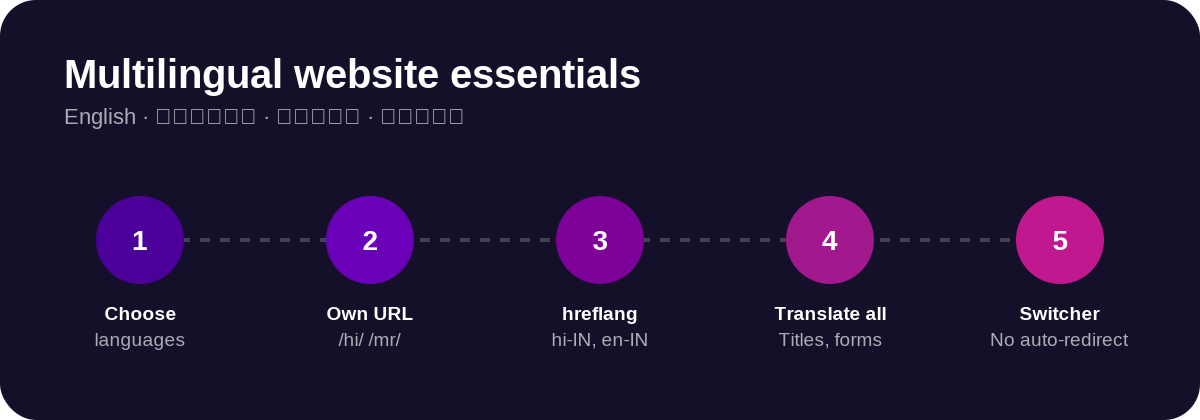
A multilingual website in India should give each language its own URL (for example /hi/ for Hindi), link equivalent pages with hreflang tags, let visitors choose their language with a visible switcher rather than redirecting them automatically, and use proper human-reviewed translation of every element, including titles, meta descriptions, forms and images with text. Start with the one or two languages your customers actually use, use good Indic fonts, and measure enquiries per language before adding more.
Give each language its own URL, such as /hi/ or /mr/, not a cookie-based switch.
Connect equivalent pages with hreflang and include an x-default fallback.
Let people choose their language; don't auto-redirect them.
Start with the languages your customers use and translate everything, not just the menu.
A multilingual website in India works best when each language has its own URL, equivalent pages are linked with hreflang, visitors choose their language through a visible switcher, and every element is properly translated. Done this way, a Hindi, Marathi, Tamil or Gujarati version can reach customers who prefer their own language, and Google can show each person the right version.
Indian languages are central to how India uses the internet: the IAMAI and Kantar Internet in India report highlighted Indic-language use as a major driver of growth, as reported by IBEF. Here's how to build a multilingual site properly.
Multilingual website essentials
Step 1: Choose your languages carefully
Translating into many languages at once is expensive and hard to maintain. Start with evidence:
Which languages do customers use when they call, WhatsApp or walk in?
Where are your customers located? A Pune business may need Marathi; a Chennai one, Tamil.
What do your competitors and marketplaces offer?
Most businesses start with English plus one or two Indian languages and add more once they see enquiries coming in.
Step 2: Give each language its own URL
Google recommends separate URLs for each language rather than switching content with cookies or browser settings. Common options:
Structure
Example
Notes
Subfolder
example.com/hi/
Simplest to manage; one domain and one site
Subdomain
hi.example.com
Can be hosted separately; slightly more setup
Separate domain
example-hindi.com
Rarely needed for languages within India
For most Indian businesses, subfolders are the practical choice. Translate the URL slugs too, or keep them in readable English consistently.
Step 3: Connect versions with hreflang
Hreflang annotations tell Google which pages are translations of each other. Each language version lists all versions, including itself:
en-IN for English (India)
hi-IN for Hindi, mr-IN for Marathi, ta-IN for Tamil, and so on
x-default for the fallback page, such as your language-selector or English page
Hreflang can be added in the page head, HTTP headers or the XML sitemap. Each page should also have a self-referencing canonical; don't point the Hindi page's canonical to the English one.
Put a visible language switcher in the header, with each language written in its own script: English, हिन्दी, मराठी.
Use language names, not flags. Flags represent countries, not languages.
Link each page to its translated equivalent, not to the home page.
Step 5: Translate everything, properly
A half-translated site feels unfinished. Translate:
Page content, headings and calls to action
Title tags and meta descriptions, so search results show in the right language
Menus, buttons, forms, error messages and confirmation emails
Image alt text and any text inside images
Structured data such as FAQs
Use machine translation only as a first draft and have a fluent speaker review it. Write naturally; people search in everyday Hindi or Hinglish, not formal textbook language. Do keyword research in each language rather than translating English keywords word for word.
Step 6: Get the technical details right
Fonts: use a well-designed font that supports Devanagari, Tamil, Bengali or other scripts you need, and load it efficiently so pages stay fast.
Line length and spacing: Indic scripts often need more line height; test layouts in every language.
Forms: accept names and addresses typed in Indian scripts, and test that emails and your CRM display them correctly.
Set the language in each page's lang attribute (for example lang="hi") so browsers and screen readers handle it properly.
Sitemaps: include every language version.
Step 7: Measure by language
Track visits, enquiries and calls per language in your analytics. If the Marathi pages bring enquiries, expand them; if a language gets little use, improve it before adding more.
Common mistakes
Translating only the home page and linking to English pages everywhere else
Auto-redirecting based on location or browser language
Missing or one-way hreflang tags
Unreviewed machine translation on important pages
Text baked into images that can't be translated
The bottom line
A multilingual website can open your business to customers who prefer Indian languages, but only if it's structured well: separate URLs, hreflang, a visible switcher, full and natural translations and good Indic typography. Start with the languages your customers already use and grow from there.
Should my business website be in Hindi or regional languages?
+
If many of your customers prefer Hindi, Marathi, Tamil or another Indian language, yes. Start with the one or two languages your enquiries and calls actually come in, rather than translating into many languages at once.
What is hreflang?
+
An annotation that tells Google which pages are language or regional versions of each other, such as hi-IN for Hindi and en-IN for English in India. It helps Google show the right version in search results.
Is Google Translate good enough for my website?
+
Machine translation is a useful first draft, but have a fluent speaker review it, especially for headings, calls to action and legal text. Awkward or wrong translations hurt trust and enquiries.
Should I use subfolders or subdomains for languages?
+
Both work. Subfolders such as example.com/hi/ are usually simplest to manage and keep everything on one domain. Google's guidance covers the trade-offs of each option.
Can I automatically show Hindi to visitors from certain states?
+
Avoid redirecting automatically. Google recommends letting people choose, because redirects based on assumptions can stop users and search engines from seeing all versions. Show a clear language switcher instead.
Articles are written and reviewed by the Incinc Media team, the people who plan, design, build and market websites, apps and campaigns for businesses from our head office in Mumbai and our branch offices in Faridabad and Greater Noida. We write about the questions clients ask us every week.
A UAE website has a few things to get right that a generic template ignores: English and Arabic, right-to-left layouts, .ae domains, data protection, VAT-inclusive pricing and fast mobile pages.
Great content can't rank if search engines can't crawl, understand and trust your pages. Use this checklist to find the technical issues that quietly hold business websites back.
When someone searches 'near me' in Mumbai, three to four businesses get the map spots and most of the calls. Here's how Google picks them, and a practical plan to become one of them.
Read
Start a project
Telluswhat you'rebuilding.
Whether you need a digital product, a creative campaign or a complete digital transformation, let's build something meaningful together.