What Is Schema Markup? A Plain-English Guide for Business Websites
Schema markup is a label your website gives search engines: this is our business, this is a product, this is an article. Here's what still matters in 2026, and what Google has quietly retired.
Schema markup is structured data, usually added as JSON-LD code, that describes a page's content in a standard vocabulary from Schema.org so search engines can understand it precisely. It isn't a direct ranking factor, but it helps Google and other systems identify your business, products, articles and breadcrumbs, and some types still enable rich results. Google has retired several rich result types, including FAQ rich results in May 2026, so focus on types that match your visible content: Organization or LocalBusiness, Product, Article, BreadcrumbList and Event.
Schema is a machine-readable description of what's on the page, usually written in JSON-LD.
It isn't a direct ranking factor, but it removes ambiguity for search engines and AI systems.
Google stopped showing FAQ rich results in May 2026 and has retired several other types; markup can stay.
Only mark up what visitors can see on the page, and test it before and after launch.
Search engines are good at reading pages, but they still have to guess. Is "Apollo" a hospital, a tyre brand or a Greek god? Is ₹4,500 a price, a shipping fee or an old offer? Schema markup removes the guesswork by labelling your content in a vocabulary every major search engine understands.
This guide explains what schema is, which types matter for business websites in 2026, what Google has retired, and how to add it without mistakes.
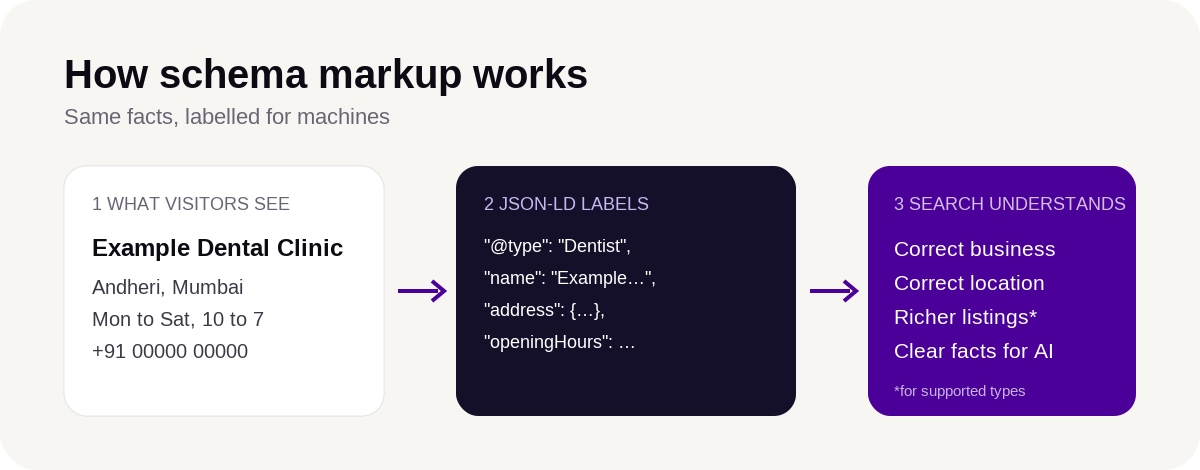
From page content to structured data
Schema markup in one sentence
Schema markup is structured data that describes the things on your page (your business, a product, an article, an event) using the shared Schema.org vocabulary, so search engines and other systems can understand them precisely.
What it looks like
Most sites add schema as JSON-LD: a small block of code in the page that visitors don't see. A simplified example for a local business:
Google recommends JSON-LD because it's easier to add and maintain than markup woven into the HTML.
Does schema help SEO?
Yes, but not the way people sometimes promise.
It isn't a direct ranking factor. Adding schema to a thin page won't make it rank.
It helps understanding. Clear labels reduce ambiguity about who you are, what you sell and where you operate.
Some types still enable rich results, such as product details, breadcrumbs and review stars where eligible, which can make listings more useful.
It supports AI search. Systems that summarise and cite the web benefit from clear, consistent facts. Read our guide to making your website AI-search friendly.
What Google has retired (so you don't chase it)
Rich results change over time. Recent changes worth knowing:
HowTo rich results were deprecated in 2023, and FAQ rich results were limited to well-known government and health sites at the same time (Google).
In June 2025, Google phased out several more types, including Course Info, Claim Review, Estimated Salary, Learning Video, Special Announcement and Vehicle Listing.
Google has said these changes don't affect rankings and that unused structured data causes no problems. FAQPage is still a valid Schema.org type that helps describe a page; it just no longer produces the expandable FAQ listing in Google.
Schema types worth using in 2026
Type
Where
Why
Organization or LocalBusiness
Home, About or Contact page
Confirms your name, logo, address, phone and social profiles
Monitor enhancement reports in Google Search Console after launch.
Our free website checker shows whether your page has schema and whether it declares your business identity.
Common mistakes
Copying a template and leaving placeholder names, phones or addresses
The same Organization block with different details on different pages
Product schema with a price that no longer matches the page
Review stars on pages without visible reviews
Marking up hidden FAQ content
The bottom line
Schema markup is a precise, machine-readable description of your content. It won't rank a weak page, but it helps search engines and AI systems understand your business clearly. Use the types that match your real content, keep them accurate, and don't chase rich results Google has retired.
Our SEO team adds and audits schema as part of every technical SEO project. For the wider foundations, see the technical SEO checklist.
Frequently asked questions
Does schema markup improve rankings?
+
Not directly. Google describes structured data as a way to understand content and, for supported types, to show rich results. Better understanding and richer listings can help click-through, but schema won't lift a weak page.
What is JSON-LD?
+
JSON-LD is a format for structured data written as a small block of code in the page. Google recommends it because it sits separately from the visible HTML and is easier to maintain.
Should I remove FAQ schema now that FAQ rich results are gone?
+
There's no need to rush. Google has said unused structured data doesn't cause problems, and FAQPage remains a valid Schema.org type. Do remove markup that is inaccurate, outdated or describes content visitors can't see.
Which schema types should a small business use?
+
Usually Organization or LocalBusiness on the home or contact page, BreadcrumbList across the site, Article on blog posts, and Product on product pages. Add Event, Course or others only if they match real content.
How do I test schema markup?
+
Use Google's Rich Results Test for types Google supports and the Schema.org validator for general correctness. After launch, check the enhancement reports in Search Console.
Articles are written and reviewed by the Incinc Media team, the people who plan, design, build and market websites, apps and campaigns for businesses from our head office in Mumbai and our branch offices in Faridabad and Greater Noida. We write about the questions clients ask us every week.
Great content can't rank if search engines can't crawl, understand and trust your pages. Use this checklist to find the technical issues that quietly hold business websites back.
AI answers are changing how people search, and a wave of new acronyms has followed. Here's what SEO, AEO and GEO really mean, what has changed, and what hasn't.
Read
Start a project
Telluswhat you'rebuilding.
Whether you need a digital product, a creative campaign or a complete digital transformation, let's build something meaningful together.