
Website Development · 2 min read
Why Is My Website Slow? Common Causes and Simple Fixes
A slow website frustrates visitors and costs enquiries. Most speed problems come from a handful of familiar causes.
Read
Cheap hosting can quietly cost you enquiries through slow pages and downtime. Here's how to choose the right hosting type in India, what to check before you pay and how to move hosts without hurting SEO.

Quick answer
Choose website hosting in India by matching the hosting type to your site: shared hosting for small brochure sites, VPS or cloud hosting for growing or busy sites, managed platforms for e-commerce or when you have no technical team. Check server or CDN location near your visitors, server response time, daily backups, SSL, security updates, support and who owns the account. web.dev treats a Time to First Byte of 0.8 seconds or less as good. When changing hosts, lower your DNS TTL a week before and keep the old host running until the switch completes, as Google advises.
Choose website hosting in India by matching the hosting type to your site, then checking server location, speed, backups, security, support and account ownership. Shared hosting suits small brochure sites, VPS or cloud hosting suits growing or busy sites, and managed platforms suit e-commerce or businesses without a technical team.
Hosting is easy to treat as a commodity, but slow pages and downtime quietly cost enquiries. Here's how to choose well.
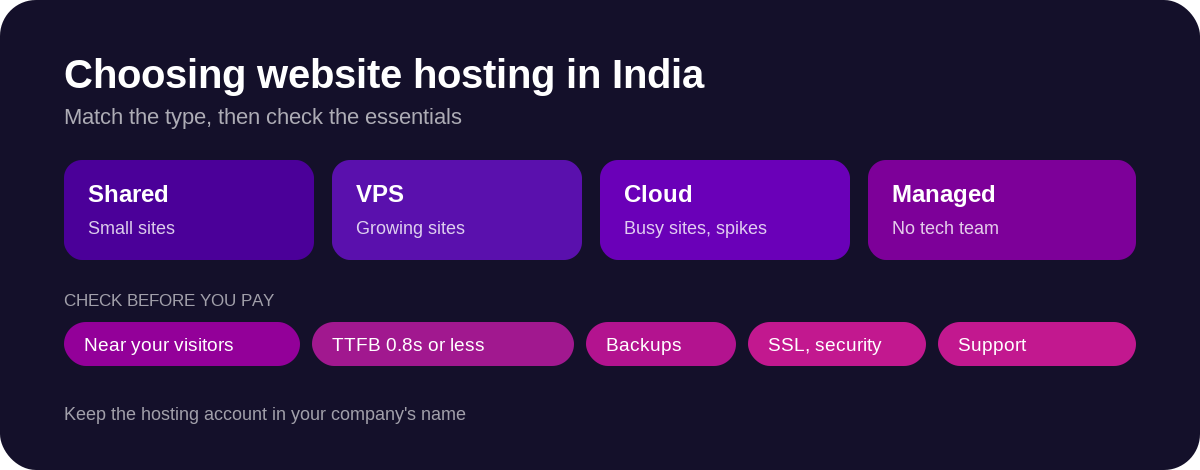
| Type | How it works | Best for |
|---|---|---|
| Shared | Many sites share one server's resources | Small brochure sites, low traffic |
| VPS | A virtual server with its own allocated resources | Growing sites, custom setups |
| Cloud | Scalable resources across many servers | Busy sites, traffic spikes, apps |
| Managed (WordPress or e-commerce platforms) | The provider handles updates, security and scaling | Teams without a developer on hand |
If your site is built on a platform like Shopify, hosting is included. For custom or WordPress sites, it's your choice. See custom website vs WordPress for how the platform affects this.
Changing hosts without changing URLs is low-risk if you follow Google's hosting move guidance:
If you're also changing URLs or redesigning, follow our redesign without losing SEO checklist.
Good hosting is fast for your visitors, backed up, secure, supported and owned by you. Match the type to your site, check the essentials before you pay, and move carefully when you switch.
Run your site through our free website checker for a quick speed read. Incinc Media's website team sets up and manages hosting as part of builds and maintenance; book a free 30-minute strategy call for a recommendation.
For a small brochure site with modest traffic, good shared or managed hosting is usually enough. Choose a provider with servers or a CDN near your visitors, daily backups, free SSL and responsive support.
Yes. The further a visitor is from the server, the longer each connection takes. Hosting in or near India, or using a CDN with Indian locations, helps Indian visitors.
Shared hosting puts many sites on one server and shares its resources, so it's cheap but can slow down. Cloud hosting gives you dedicated, scalable resources, suited to growing or busy sites.
Not if done carefully. Keep the same URLs, lower your DNS TTL in advance, keep the old host running until the change completes and make sure the new server isn't blocking Google. A short dip in crawling is normal.
Your business. Keep the hosting and domain in your company's name and email, and give your developer access, so you can switch providers whenever you want.
Written by
Articles are written and reviewed by the Incinc Media team, the people who plan, design, build and market websites, apps and campaigns for businesses from our head office in Mumbai and our branch offices in Faridabad and Greater Noida. We write about the questions clients ask us every week.
Not sure your hosting is right?
Book a free 30-minute strategy call. We'll check your site's speed and setup and recommend hosting that fits your traffic and budget, with every account in your name.
Website Development · 2 min read
A slow website frustrates visitors and costs enquiries. Most speed problems come from a handful of familiar causes.
Website Development · 5 min read
Most small-business websites are not hacked by clever attackers, but through old plugins, weak passwords and no backups. Here are the basics that prevent most problems.
Website Development · 4 min read
A website isn't finished at launch. A simple routine of updates, backups and checks keeps it secure, fast and bringing in enquiries.
What we do
Technology, creative production and digital marketing from one in-house team, with offices in Mumbai, Faridabad and Greater Noida.
All servicesStart a project
Whether you need a digital product, a creative campaign or a complete digital transformation, let's build something meaningful together.
Or call +91 81081 14819·mail@incincmedia.com